bindingInfo.setMapLayer(col, layer)
|
Specifies the map layer corresponding to a geographic field.
Parameters
- col
-
Field for which layer is assigned
- layer
-
One of the following constants:
Chart.STATE
Chart.CITY
Chart.COUNTRY
Chart.ZIP
Chart.PROVINCE
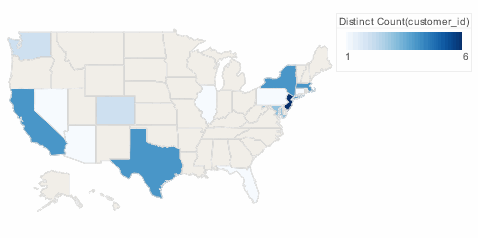
Example
Chart1.query = "customers";
Chart1.chartStyle = Chart.CHART_MAP;
Chart1.bindingInfo.setColorField("customer_id",Chart.NUMBER);
Chart1.bindingInfo.setFormula("customer_id",Chart.DISTINCTCOUNT_FORMULA,Chart.AESTHETIC_COLOR);
Chart1.bindingInfo.geoFields = [['state',Chart.STRING]];
Chart1.mapType = Chart['MAP_TYPE_U.S.'];
Chart1.bindingInfo.setMapLayer("state",Chart.STATE); (1)
Chart1.bindingInfo.shapes['DistinctCount(customer_id)'] = new StaticShapeFrame(GShape.NIL);| 1 | Use setMapLayer to set the "state" field as the State layer. |
Dashboard script that modifies bindingInfo should generally be placed in the onRefresh handler. See Add Dashboard Script.
|