bindingInfo.setGroupTotal(field, header, Boolean)
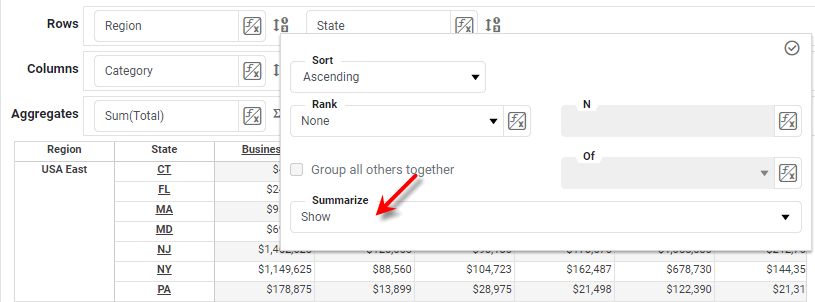
Specifies whether the subtotal for a given parent group should be displayed. When true, this is equivalent to selecting ‘Show’ in the ‘Summarize’ menu of the Crosstab Editor.
Parameters
- field
-
String: Name of grouped column to total
- header
-
StyleConstant.ROW_HEADERorStyleConstant.COLUMN_HEADER - Boolean
-
true: display group total
false: suppress group total (default)
Example
Crosstab1.query = 'Sales';
Crosstab1.bindingInfo.rowFields = ['Region','State'];
Crosstab1.bindingInfo.colFields = ['Category'];
Crosstab1.bindingInfo.measureFields = ['Total'];
Crosstab1.bindingInfo.setFormula('Total', StyleConstant.SUM_FORMULA);
Crosstab1.bindingInfo.setGroupTotal('Region',StyleConstant.ROW_HEADER,true);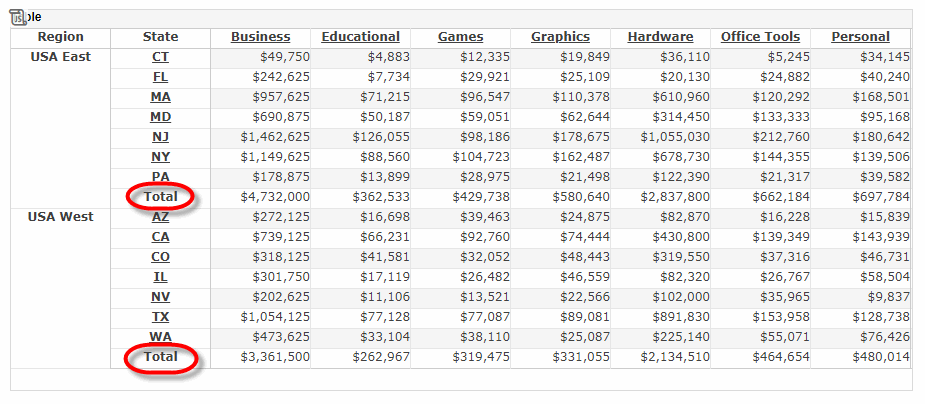
|
Either syntax below can be used in component script: For onInit/onRefresh scripts, and for component and property scripts on other components, the second (qualified) form is required. |