All Properties
To set a property manually, follow the steps below. File paths in properties can be absolute, or relative to the repository directory. Relative paths can use the sree.home environment variable to specify the storage root, for example, $(sree.home)/filename.xml.
| Entering illegitimate property values can prevent the software from operating correctly. |
-
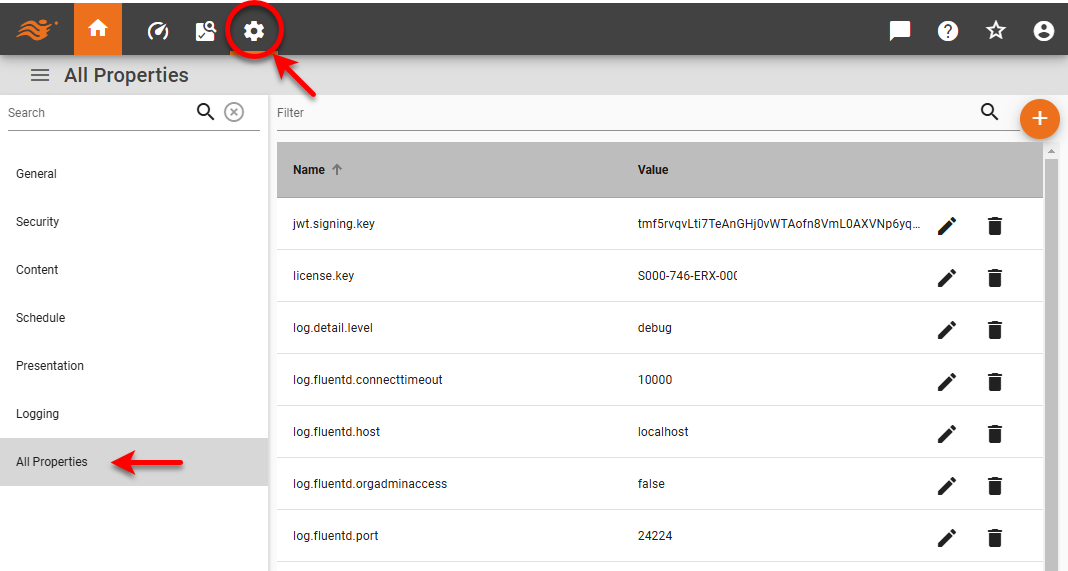
Press the ‘Settings’ button
 at the top of Enterprise Manager.
 -
Select the All Properties page in the left panel.
-
To locate an existing property in the list, type some or all of the property name in the ‘Filter’ field
 above the table.
 -
To edit an existing property, press the ‘Edit’ button
 next to the property. Enter the desired value and press ‘Accept’ button
  .
. -
To delete an existing property, press the ‘Delete’ button
 next to the property.
 -
To add a new property, press the ‘Add Property’ button
 button above the table.
Chart Properties
The following table lists a variety of charting properties.
- graph.3dbar.maxcount
-
The maximum number of dimension values that can be displayed in a 3D Bar Chart (default is 5000).
- graph.3dpie.maxcount
-
The maximum number of dimension values that can be displayed in a 3D Pie Chart (default is 2,000).
- graph.area.maxcount
-
The maximum number of dimension values that can be displayed in an Area Chart (default is 5000).
- graph.axis.inplot
-
Specifies whether the maximum measure value is included within the plot region. (Default is
false.) See also inPlot. - graph.axislabel.maxcount
-
The maximum number of labels to display on a Chart axis (default is 2000).
- graph.bar.maxcount
-
The maximum number of dimension values that can be displayed in a Bar Chart (default is 10,000).
- graph.candle.maxcount
-
The maximum number of dimension values that can be displayed in a Candle Chart (default is 2,000).
- graph.line.maxcount
-
The maximum number of dimension values that can be displayed in a Line Chart (default is 100,000).
- graph.maxarea
-
The maximum allowable Chart area in square pixels (default is 16,000,000). If the area exceeds this value, the Chart will attempt to rescale to this size.
- graph.pareto.maxcount
-
The maximum number of dimension values that can be displayed in a Pareto Chart (default is 2,000).
- graph.pie.maxcount
-
The maximum number of dimension values that can be displayed in a Pie Chart (default is 2,000).
- graph.point.maxcount
-
The maximum number of dimension values that can be displayed in a Point Chart (default is 10,000,000).
- graph.radar.maxcount
-
The maximum number of dimension values that can be displayed in a Radar Chart (default is 2,000).
- graph.script.action.support
-
When set to
true, enables interactive Dashboard Chart features (brushing, zoom, data tip, flyover, etc.) for Charts that are modified by script. By default, these features are disabled for scripted Charts because scripts may interfere with the operation of these features. - graph.stock.maxcount
-
The maximum number of dimension values that can be displayed in a Stock Chart (default is 2,000).
- graph.subgraph.maxcount
-
The maximum number of nested subgraphs for facet-type Chart. If this value is exceeded, the chart is truncated to the maximum number of subgraphs. (See also
graph.ggraph.maxcountbelow.) - graph.ggraph.maxcount
-
The maximum number of nested subgraphs for facet-type Chart. If this value is exceeded, an error is produced and the chart is not generated. (See also
graph.subgraph.maxcountabove.) - graph.waterfall.maxcount
-
The maximum number of dimension values that can be displayed in a Waterfall Chart (default is 2,000).
- graph.circle.packing
-
For Circle Packing Charts, set to
circleto produce perfect circles (default). Set tofill_xto fill only the Chart width (producing horizontal ovals), or set tofillto fill both width and height (producing ovals determined by the Chart aspect ratio). - map.border.color
-
Specifies the border color between geographical regions on a map chart. Color can be specified as a hex string (e.g.,
#008000or008000) or as a case-insensitive CSS color name (e.g.,LightCyan). - map.default.color
-
Specifies the default color for map shapes that contain data, and applies when no static color is selected in the ‘Visual’ panel. Color can be specified as a hex string (e.g.,
#008000or008000) or as a case-insensitive CSS color name (e.g.,LightCyan). This is the default for the ‘Map Default Color’ property in the ‘Chart Properties’ settings. - map.empty.color
-
Specifies the default color for map shapes that do not contain data. Color can be specified as a hex string (e.g.,
#008000or008000) or as a case-insensitive CSS color name (e.g.,LightCyan). - map.mapping.dir
-
Directory where map files are stored. Default is map in Storage root. See Storage for more information.
- map.selection.enabled
-
When
false, prevents user selections on a map from displaying a solid outline. (Default istrue.)
Data Source Properties
The following table lists a variety of properties related to data source interactions.
- datasource.registry.file
-
List of
.xmlfiles that are used to define all the available data sources. - db.caseSensitive
-
When
true, wraps all column identifiers within query with double quotes to preserve identifier case. Default isfalse. - formula.avg.keep.type
-
Set to
trueto keep the data type of an average formula the same data type as the input in order to match SQL behavior (e.g., truncating the average result to integer if the input field is of integer data type). - olap.cancel.enabled
-
Set to
true(default) to enable query cancellation for OLAP databases. This feature cancels currently executing queries when a user makes updates to their selections. Set tofalseto prevent errors on databases that do not support query cancellation. - query.cache.data
-
Set to
true(default) to cache query result sets for reuse across Data Worksheets and Dashboards. - query.registry.file
-
List of
.xmlfiles that are used to define all the available queries. - query.variable.unique
-
If query variables are declared as unique, variables with the same name across different queries are treated as one variable. Otherwise, each query contains its own set of variables.
- remove.outerJoin.only
-
When
false, the query engine removes joined tables with no columns in the ‘select’ and ‘where’ clauses, such as when a condition is dropped due to null parameter. - string.compare.caseSensitive
-
Default grouping and ordering is now case-insensitive, which is consistent with most databases. Set this property to
trueto revert to pre-9.1 behavior.
Export Properties
The following table lists properties related to exporting Dashboards.
- excel.sheet.maxrows
-
Sets the integer row limit for every table within an Excel export. A message is displayed below each limited table to indicate that the data in the table has been truncated.
- excel.table.datatab
-
When
true(default), displays all dashboard Table data views on additional Excel sheets. This may increase the size of the export. - excel.vs.export.grid.show
-
When
true(default), specifies that gridlines will be shown in the Excel export for a Dashboard, and that default text backgrounds are transparent. Whenfalse, gridlines are suppressed and default text backgrounds are white. This property applies only when the ‘Expand Components’ export property is enabled, and affects only the main export tab (not the individual data tabs). - export.csv.delimiter
-
Delimiter used when exporting a CSV file.
- export.expandComponents
-
For Dashboard email and export operations, sets the default export option to ‘Expand Components’ rather than ‘Match Layout’.
- table.export.format
-
When set to
csv, table data exported from a Dashboard or Data Worksheet will use CSV format. Some formatting may be lost. When set toxls, exported data will use Excel format, spanning multiple Excel sheets if needed, and preserving all formatting. If the property is left unspecified, tables with greater than 10000 rows are exported in CSV format, otherwise in Excel format.
Format Properties
The following table lists a variety of properties related to format and appearance.
- barcode.bar.width
-
The width (in pixels) of the thinnest bar in a barcode. Other bars will change their size relative to this.
- barcode.resolution
-
The output resolution of the barcode when either the barcode is being output to a device other than the screen, or the barcode is being generated on a headless machine and the screen resolution could not be determined. The default resolution is 72 dpi.
- format.date
-
Format used for all date data. See Add Data Format for more information.
- format.number.round
-
If formatting has not been specified for a number displayed in a Dashboard, this property controls the rounding of the value. Available settings are shown below in Rounding Settings. The default is
ROUND_HALF_EVEN. - format.percent.round
-
For a percent format, this property controls the rounding of the value. Available settings are shown below in Rounding Settings. The default is
ROUND_HALF_EVEN. - format.time
-
Format used for all time data (Date). See Add Data Format for more information.
Rounding Settings
The available rounding options for format.number.round and format.percent.round are shown below:
| Round Setting | Meaning |
|---|---|
|
Round away from zero |
|
Round toward zero |
|
Round toward positive ∞ |
|
Round toward negative ∞ |
|
Round toward nearest neighbor unless both neighbors are equidistant, in which case round up |
|
Round toward nearest neighbor unless both neighbors are equidistant, in which case round down |
|
Round toward nearest neighbor unless both neighbors are equidistant, in which case round to even neighbor |
|
Apply no rounding |
Image Properties
The following table lists a variety of image properties. See Presentation for related properties in Enterprise Manager.
- image.antialias
-
PNG images are antialiased by default when using j2d. Set this property to
falseto turn off antialias. (Antialias gets rid of “jaggies”.) - image.filtered
-
Default is
false(recommended). Turns PNG compression on or off. This property is ignored if JPEG images are used. - Graphics.Image.ScaleSmooth
-
Set to
trueto give priority to image smoothness over scaling speed. Set tofalse(default) to give priority to speed.
Limits and Safeguards
The following table lists a variety of limits and safeguards. See Tailor Performance for related properties.
- always.warn.joinMaxRows
-
If set to
false(default), the user will be shown a single warning for the session when thejoin.table.maxrowslimit is violated. (See below.) Set totrueto warn the user for each individual violation. - asset.max.idle
-
Sets the duration (in milliseconds) that a Dashboard remains active in the Portal when no user interactions are detected. Default is 2 hours (7,200,000 milliseconds). There is no timeout for Dashboards that are open for editing in Visual Composer. Dashboards open in the Portal are automatically closed after three minutes if the web browser is closed.
- asset.sample.maxrows
-
The row limit used for subqueries (inner select queries) performed before aggregation or joining. In some cases, subqueries that return too few results may not possess any rows that match the specified join condition. In these case, a higher subquery limit may be necessary to ensure that the final query returns results.
- crossJoin.maxCellCount
-
Sets the limit for number of cells in the result set of a cross join. (Default is 500000000.)
- csv.import.max
-
Sets the maximum size in bytes for CSV files imported into a Data Worksheet Embedded Table (see Upload Data).
- DistinctTableLens.maxrow
-
Sets the maximum number of distinct values to display in a Condition ‘Browse Data’ menu.
- excel.sheet.maxrows
-
Sets the integer row limit for every table within an Excel export. A message is displayed below each limited table to indicate that the data in the table has been truncated.
- http.session.maxActive
-
Maximum number of active sessions (default=10000). If a new session is created when the number of active sessions exceeds this property, the oldest session is invalidated.
- http.session.maxPerClient
-
Maximum number of sessions that a client (user/host) may have (default=5), not including
localhost. If a new session is created when the number of active sessions exceeds this property, the oldest session for that client is invalidated. - http.session.maxWebsocketPerUser
-
Maximum number of websocket connections that a single HTTP session may have (default=20). If a new connection is requested when the number of active connections exceeds this property, the connection fails and a SockJS downgrade will occur (XHR streaming, long polling, etc.).
- http.session.timeout
-
HTTP session timeout in seconds (default is 1800, which is 30 minutes). If no user activity is detected within this time period, the user will be shown a "session timeout" countdown allowing them the opportunity to keep the session alive if desired. (If the session timeout is set in the web.xml file, that setting takes precedence over this property.)
- join.table.maxrows
-
Sets the maximum number of rows to retain in any Data Block that is created by joining two or more Data Blocks in a Data Worksheet. The limit does not apply to joins performed in the ‘Database Query’ dialog box (see Query Data). By default, the user will be shown only a single warning each session if the limit is violated. To warn the user for each individual violation, set
always.warn.joinMaxRows=true. - olap.table.maxrow
-
Determines how many rows to retrieve when creating unique values for selection lists. Default is 10000.
- query.analysis.maxrow
-
Number of rows that the Visualization Recommender should use when suggesting components to display data. Default=5000. (The Visualization Recommender is displayed when the user selects ‘Open Wizard’ in the ‘New Dashboard’ dialog box.)
- query.cache.limit
-
With
query.cache.dataenabled, specifies the number of query result sets to be retained in the cache. Default: 100 datasets (for Data Worksheets/Dashboards). - query.cache.timeout
-
With
query.cache.dataenabled, specifies the amount of time (ms) that result sets for Data Worksheet and Dashboard queries persist in the cache. Default: 10 minutes. - query.preview.maxrow
-
Sets the maximum number of rows retrieved for design-time requests. This includes Data Worksheet ‘Live Data View’ and Dashboard design views in Visual Composer. See Tailor Performance for more information.
- query.preview.timeout
-
Sets the timeout interval (seconds) for queries in Data Worksheet and Dashboard live data mode.
- query.runtime.maxrow
-
Sets the global maximum size for all queries during Dashboard runtime execution. Data limits set at Dashboard level are not permitted to exceed this global limit.
The ordering of a result set may differ for different databases. Limiting a dataset by row count may therefore yeild different results for different databases (if explicit sorting has not been specified). - query.runtime.timeout
-
Sets the global timeout (seconds) for all queries during Dashboard runtime execution. If the timeout is too short, this can cause a data-read error in some cases.
- rest.cache.timeout.millis
-
Sets the timeout (milliseconds) for REST queries to be cached. Use a value greater than 0 to prevent repeated execution of similar REST queries. If a request is made before the cache entry expires, the cached response will be used instead of executing a new HTTP request. (Default is 0, no caching of REST queries.)
- selectionList.maxrow
-
The maximum number of items to be displayed in a Selection List or Selection Tree (default 50000).
- script.execution.timeout
-
A safety-net for script execution time, especially for infinite loops. Times-out the script if execution time exceeds specified value (in seconds).
- table.output.maxrow
-
Sets the global maximum row limit for all Tables, Crosstabs, and Freehand Tables during Dashboard runtime execution. This property controls the size of the final displayed table, following any grouping and aggregation.
- table.output.maxcol
-
Sets the global maximum column limit for all Tables, Crosstabs, and Freehand Tables during Dashboard runtime execution.
Log Properties
The following table lists a variety of log properties. See Logging to customize log detail levels and log message formats.
- log.detail.level
-
A logging level, one of the following:
debug(debugging messages),info(non-critical information messages),warn(non-fatal errors and critical messages),error(fatal errors). - log.level.inetsoft.performance
-
Set
log.level.inetsoft.performance=INFOto record performance information in the log at ‘Info’ level. - log.output.file
-
Log file path.
- log.output.stderr
-
trueto send output to the stderr. - report.log.count
-
Sets the number of backup log files.
- report.log.max
-
Sets the maximum log file size.
Mail Properties
The following table lists a variety of email properties. See Configure Server Email for related properties in Enterprise Manager.
- mail.from.address
-
‘From’ email address used in email messages. Set to
trueto allow users to enter a ‘From’ address that is different from their own email address. Default isfalse. - mail.smtp.host
-
Mail SMTP host name.
- mail.smtp.port
-
Specifies the SMTP port number. The default for non-SSL use is port 25. The default for SSL use is port 465.
- mail.subject.format
-
Format for the mail subject line. It is a message format (java.text.MessageFormat). There are two parameters used in generating the subject line. The first parameter is the alias, and the second parameter is the date and time. For example, a possible format could be
Dashboard {0} generated at {1,time} on {1,date}. - mail.tls
-
When set to
true, specifies that aSTARTTLScommand should be issued. The default isfalse. - mail.smtp.ssl.protocols
-
Specifies an alternate SMTP protocol. Example:
mail.smtp.ssl.protocols=TLSv1.2.
Materialized View Properties
The following table lists configuration properties for materialized views. See Materialized View for more information about materialized views.
- mv.cache.data
-
When set to
true, caches materialized view result sets so that they can be shared across Dashboards. - mv.detail.data
-
When set to
true, populates Dashboard Chart and Crosstab ‘Show Details’ data from an existing materialized view rather than from the database. - mv.enabled.all
-
Sets the ‘MV On-demand by Default’ property (see Materialized View).
- mv.metadata
-
Sets the ‘Use meta-data for editing if MV is not available’ property. Default is
false. - mv.ondemand
-
Sets the ‘Enable MV On-demand’ property. Default is
false. - mv.required
-
Sets the ‘Fail if MV is not available at runtime’ property. Default is
false. - mv.run.background
-
When set to
true(default isfalse), enables the ‘Run in Background’ option for new materialized views by default. The ‘Run in Background’ option can then be disabled as needed for particular materialized views. - xmapTask.thread.count
-
Maximum number of materialized view query execution threads in a Data Node (for ‘cpu’ and ‘session’ keys only). Default is 12 times the CPU count.
PDF and Font Properties
The following table lists a variety of PDF and font properties. See PDF Settings for related properties.
- default.font.family
-
Specifies the InetSoft web interface default font. This font can be referenced using the font name "Default". If your installation needs to support a specific language, install a font for that language (e.g., Arial), and then specify this font as the default font using
default.font.family. - font.afm.path
-
Type 1 AFM file directories.
- font.cmap.path
-
Cmap file directories. Only used when processing CJK characters.
- font.metrics.source
-
TrueType to use TrueType fonts as specified in the directories in
font.truetype.path. - font.preload
-
trueto pre-load the TrueType and Type 1 font information. This causes the server startup to be slower. If set tofalse, the loading is done the first time a PDF file is generated. - font.ratio.x
-
A list of ratios used to adjust horizontal character spacing. This is mostly used when the font width information is different between Java and PDF. The ratio can be used to adjust the spacing so that the generated PDF matches the actual font size used in PDF viewers. It is a list of semicolon-separated ratios. Each ratio is specified by a font name and, optionally, a font style, followed by the ratio, e.g.,
MS Hei:1.1;Algerian-bolditalic:1.02. - font.ratio.y
-
Similar to
font.ratio.x, but is applied to the font vertical spacing. - font.truetype.path
-
TrueType font directories.
- pdf.compress.image
-
trueto compress all image data. - pdf.compress.text
-
trueto compress all text data. - pdf.embed.font
-
trueto embed the font in the generated PDF file. - pdf.embed.cmap
-
trueto embed the cmap in the generated PDF file. - pdf.font.mapping
-
Font mapping from Java font to fonts used in PDF. It is a semicolon separated pairs of font names. Each pair is separated by a colon, e.g.,
MS Hei:HeiseiKakuGo-W5-Acro;MS Song:Song-Acro. See also Font Mapping. - pdf.generate.links
-
trueto create hyperlinks in the resulting PDF file.falseto turn off hyperlink generation and speed up the PDF generation process. - pdf.map.symbols
-
Map symbol characters to symbol fonts. This is required if symbol characters are used.
- pdf.open.bookmark
-
trueto have bookmarks immediately displayed when the generated PDF files are opened in Adobe Acrobat. - pdf.open.thumbnail
-
trueto have thumbnails immediately displayed when the generated PDF files are opened in Adobe Acrobat. - pdf.output.ascii
-
trueto generate only ASCII output in the PDF file. No ASCII data is encoded to seven bit data. - pdf.output.attachment
-
Default is
true. This sends generated PDF as an attachment. If set tofalse, the PDF is returned as-is. In IE 4 through 5, a URL referring to dynamically generated PDF could result in a blank page. Optionally, it can be set toembed, which will cause a PDF request to return a HTML page with an<embed>tag, which normally displays correctly in IE without causing a dialog to prompt users to save the PDF. - text.encoding.utf8
-
Set to
falseto use the encoding specified for the local operating system instead of the UTF8 encoding. Default istrue. - viewsheet.font.size
-
Specifies the default font size for all Dashboards. A plain integer value specifies an absolute size for all fonts. An integer preceded by a + or - indicates an increase or decrease in size from the default font sizes (e.g.,
viewsheet.font.size=+5). - vs.font.asDefault
-
When set to
true, uses the Dashboard default font for a Table rather than the Table Style font. When set tofalse(default), uses the specified Table Style font.
Portal Properties
The following table lists a variety of User Portal properties. See Presentation and Tailor Performance for the related pages in Enterprise Manager.
- share.email.enabled
-
Enables the ‘Email’ option
 under the ‘Social Sharing’ button
  in the Dashboard toolbar. Default is
 true. - share.facebook.enabled
-
Enables the ‘Facebook’ option
 under the ‘Social Sharing’ button in the Dashboard toolbar. Default is
 true. - share.linkedin.enabled
-
Enables the ‘LinkedIn’ option
 under the ‘Social Sharing’ button in the Dashboard toolbar. Default is
 true. - share.twitter.enabled
-
Enables the ‘Twitter’ option
 under the ‘Social Sharing’ button in the Dashboard toolbar. Default is
 true. - share.link.enabled
-
Enables the ‘Copy Link’ option
 under the ‘Social Sharing’ button in the Dashboard toolbar. Default is
 true. - share.slack.enabled
-
Enables the ‘Slack’ option
 under the ‘Social Sharing’ button in the Dashboard toolbar. Default is
 false. Requiresshare.slack.urlto also be set, otherwise the option remains hidden. - share.slack.url
-
The Slack incoming webhook URL for a channel. When a user shares the Dashboard using the ‘Slack’ option
, the server POSTs a JSON SlackMessage to this URL containing the Dashboard link. - share.googlechat.enabled
-
Enables the ‘Google Hangouts Chat’ option
 under the ‘Social Sharing’ button in the Dashboard toolbar. Default is
 false. Requiresshare.googlechat.urlto also be set, otherwise the option remains hidden. - share.googlechat.url
-
The Google Hangouts Chat incoming webhook URL. When a user shares the Dashboard using the ‘Google Hangouts Chat’ option
, the server POSTs a card-style JSON message to this URL containing a <users/all>mention and a clickable ‘Click here to view’ link. - share.opengraph.title
-
The fallback
og:title<meta>tag injected into the User Portal’s HTML<head>for social sharing previews. Default is “Business Intelligence Software | Dashboard Reporting”. - share.opengraph.description
-
The fallback
og:description<meta>tag injected into the User Portal’s HTML<head>for social sharing previews. Default is “InetSoft is a pioneer in the field of data intelligence…”. - share.opengraph.sitename
-
The fallback
og:site_name<meta>tag injected into the User Portal’s HTML<head>for social sharing previews. Default is “InetSoft.com”. - share.opengraph.image
-
The fallback
og:imageURL<meta>tag injected into the User Portal’s HTML<head>for social sharing previews. Default is/images/logo.png. (Relative paths are resolved to the server’s base URL.) - accessibility.enabled
-
Set to
trueto enable features for Rehabilitation Act Section 508 compliance. - asset.ignore.filtering
-
When
true(default), this displays a warning message to the Dashboard designer when a Data Worksheet data block returns no data. The warning indicates that conditions on all data blocks will be dropped in Dashboard design view (only) to help facilitate formatting. Whenfalse, all conditions are kept in place (which may make Dashboard formatting more difficult). - flash.wmode
-
Controls z-index assignment of HTML layers for Dashboards within IFrames. It can be assigned one of the following values:
window,opaque,transparent. Thewindowsetting allows the browser to determine how the IFrame and Dashboard are displayed on the page. Theopaquesetting presents the IFrame and Dashboard with opaque background in their designated layer. Thetransparentsetting presents the IFrame and Dashboard with transparent background in their designated layer. - help.url
-
URL for the documentation. Default is http://www.inetsoft.com/docs/2023/userhelp.
- hidden.datasource.types
-
Comma-separated list of datasource names to be hidden in the User Portal datasource catalog. If a datasource is included in both the
visible.datasource.typesandhidden.datasource.typeslists, it will be hidden. If the property is not specified or is empty, it will not be applied.See a list of available data sources…
JDBC, Microsoft Access, Oracle, SQL Server, MySQL, DB2, jTDS, Ingres, Sybase, Derby, Derby Embedded, Informix, SQL Anywhere, PostgreSQL, Dremio, Impala, Vertica, Teradata, SAP HANA, Snowflake, Actian, Amazon Aurora/RDS MySQL, Amazon Aurora/RDS PostgreSQL, AWS EMR, AWS Redshift, Aster Data nCluster, Cisco Info Server, Exasol, Google Cloud SQL, IBM AS400, MapR, MariaDB, MemSQL, MonetDB, Pivotal Greenplum, Progress OpenEdge, FileMaker, LucidDB, Netezza, SQLite, SQL Server Express, Google BigQuery, Siebel CRM (Oracle), Siebel CRM (SQL Server), HPCC, OrientDB, Aerospike, Apache Drill, Presto, PHOENIX, Text/Excel Directory, Google Spreadsheets, SAP ABAP, SAP BAPI, SAP Tables, R, Facebook Ad Insights, Google Analytics, Sharepoint Online, Apache Hive, Data.gov JSON, OData, MongoDB, Cassandra, Couchbase, Redis, Cosmosdb, Salesforce, REST JSON, REST XML, Rest.ActiveCampaign, Rest.Airtable, Rest.Appfigures, Rest.Asana, Rest.AzureBlob, Rest.AzureSearch, Rest.CampaignMonitor, Rest.Chargebee, Rest.Chargify, Rest.ChartMogul, Rest.ConstantContact, Rest.Copper, Rest.DataDotWorld, Rest.Firebase, Rest.FortyTwoMatters, Rest.Freshdesk, Rest.Freshsales, Rest.Freshservice, Rest.GitHub, Rest.GitLab, GoSquared, Rest.GoogleCalendar, GraphQL, Rest.Harvest, Rest.HelpScoutDocs, Rest.HubSpot, Rest.InfluxDB, Rest.Insightly, Rest.Intervals, Rest.Jira, Rest.Jive, Rest.Lighthouse, Rest.Linkedin, Rest.LiveAgent, Rest.Mailchimp, Rest.Mixpanel, monday.com, Rest.Nicereply, Rest.Pipedrive, Rest.PipelineDeals, Rest.Prometheus, Rest.SEOmonitor, Rest.SalesforceReports, Rest.SendGrid, Rest.ServiceNow, Shopify, Rest.Smartsheet, Rest.Square, Rest.Stripe, Rest.SurveyMonkey, Rest.TeamDesk, Rest.Toggl, Rest.Twilio, Rest.Twitter, Rest.WordPress, Rest.Xero, Rest.YouTubeAnalytics, Rest.Zendesk, Rest.ZendeskSell, Rest.ZohoCRM
- html.ratio.x
-
Specifies the horizontal scaling ratio that relates sizes and positions of elements and fonts in design view to their HTML representations within the Portal. (Default=1.3.) This setting should be changed only to correct visual abnormalities in the Portal display.
- html.ratio.y
-
Specifies the vertical scaling ratio that relates sizes and positions of elements and fonts in design view to their HTML representations within the Portal. (Default=1.2.) This setting should be changed only to correct visual abnormalities in the Portal display.
- hyperlink.indicator
-
When set to
true(default), automatically displays hyperlinks with underlining. When set tofalse, displays hyperlinks without underlining. (Users can manually format the hyperlinks as desired.) - javascript.java.packages
-
Specifies a comma-separated list of additional Java packages to be exposed in the restricted script execution environments of Visual Composer. By default, scripts created in these environments provide access only to the following Java packages:
java.awt,java.text,java.util,java.sql,inetsoft.graph.*,inetsoft.report,inetsoft.report.lens,inetsoft.report.filter,inetsoft.uql,inetsoft.report.painter.Exposing additional Java packages may allow users to create malicious scripts, so you must thoroughly consider any such additions from a security standpoint. - portal.history.bar
-
Set to
true(default) to display the Portal history bar, which shows recently accessed Dashboards. This can be overridden by the user through the Portal ‘Preferences’ dialog box. - portal.home.link
-
Sets the URL of the ‘Home’ button in the User Portal. (The default is the
index.htmllanding page). This can be an absolute URL such as https://www.google.com, or a path relative to/app/such ascomposer. - portal.customLoadingText
-
Specifies text to display on the loading screen when the user logs into the User Portal. The message is displayed under the "Please wait, the application is loading" message and logo.
- portal.customLogo.enabled
-
When set to
true, this reveals the ‘Default Favicon’ property Look and Feel page. Default isfalse. Uncheck the ‘Default Favicon’ property to upload a custom favicon. - portal.logout.url
-
The URL to which the user is directed when they select ‘Log Out’. If SSO is in effect, this redirect occurs after the user is directed to
sso.logout.url. - olap.table.originalContent
-
Set to
true(default) to display the value of a cube dimension in a Selection List with all its hierarchical components, otherwise set tofalse. (Applies to Chart labels and Selection Lists.) - olap.drillthrough.maxrows
-
Determines how many rows to display for a ‘Show Details’ operation against an OLAP cube. Default is 10.
- output.null.to.zero
-
When set to
true(default), Dashboard Gauges display zero (0) when an empty result set is returned. When set tofalse, Gauges retain the value shown for the previous non-empty result set. - repository.tree.sort
-
Repository tree sorting order:
none,Ascend, orDescend. - sort.crosstab.aggregate
-
When set to
true, allows a Crosstab in a Dashboard to be sorted by aggregate value. Default isfalse. - sort.crosstab.dimension
-
When set to
true(default), allows a Crosstab in a Dashboard to be sorted by dimension value. - sree.collator
-
Specifies a custom collator class for sorting. When set to
inetsoft.util.Collator_DEACCENT, this removes all diacritical marks from letters prior to sorting strings (e.g.,ëis sorted ase). - viewsheet.chart.adhoc
-
When set to
true(default), configures the ‘Enable Ad Hoc Editing’ property of Dashboard charts to be enabled by default. - viewsheet.hyperlink.singleClick
-
When set to
true, bypasses the hyperlink menu if the clicked region has only a single associated hyperlink. (Default isfalse.) - visible.datasource.types
-
Comma-separated list of datasource names to be displayed in the User Portal data source catalog. If a datasource is included in both the
visible.datasource.typesandhidden.datasource.typeslists, it will be hidden. If the property is not specified or is empty, it will not be applied.See a list of available data sources…
JDBC, Microsoft Access, Oracle, SQL Server, MySQL, DB2, jTDS, Ingres, Sybase, Derby, Derby Embedded, Informix, SQL Anywhere, PostgreSQL, Dremio, Impala, Vertica, Teradata, SAP HANA, Snowflake, Actian, Amazon Aurora/RDS MySQL, Amazon Aurora/RDS PostgreSQL, AWS EMR, AWS Redshift, Aster Data nCluster, Cisco Info Server, Exasol, Google Cloud SQL, IBM AS400, MapR, MariaDB, MemSQL, MonetDB, Pivotal Greenplum, Progress OpenEdge, FileMaker, LucidDB, Netezza, SQLite, SQL Server Express, Google BigQuery, Siebel CRM (Oracle), Siebel CRM (SQL Server), HPCC, OrientDB, Aerospike, Apache Drill, Presto, PHOENIX, Text/Excel Directory, Google Spreadsheets, SAP ABAP, SAP BAPI, SAP Tables, R, Facebook Ad Insights, Google Analytics, Sharepoint Online, Apache Hive, Data.gov JSON, OData, MongoDB, Cassandra, Couchbase, Redis, Cosmosdb, Salesforce, REST JSON, REST XML, Rest.ActiveCampaign, Rest.Airtable, Rest.Appfigures, Rest.Asana, Rest.AzureBlob, Rest.AzureSearch, Rest.CampaignMonitor, Rest.Chargebee, Rest.Chargify, Rest.ChartMogul, Rest.ConstantContact, Rest.Copper, Rest.DataDotWorld, Rest.Firebase, Rest.FortyTwoMatters, Rest.Freshdesk, Rest.Freshsales, Rest.Freshservice, Rest.GitHub, Rest.GitLab, GoSquared, Rest.GoogleCalendar, GraphQL, Rest.Harvest, Rest.HelpScoutDocs, Rest.HubSpot, Rest.InfluxDB, Rest.Insightly, Rest.Intervals, Rest.Jira, Rest.Jive, Rest.Lighthouse, Rest.Linkedin, Rest.LiveAgent, Rest.Mailchimp, Rest.Mixpanel, monday.com, Rest.Nicereply, Rest.Pipedrive, Rest.PipelineDeals, Rest.Prometheus, Rest.SEOmonitor, Rest.SalesforceReports, Rest.SendGrid, Rest.ServiceNow, Shopify, Rest.Smartsheet, Rest.Square, Rest.Stripe, Rest.SurveyMonkey, Rest.TeamDesk, Rest.Toggl, Rest.Twilio, Rest.Twitter, Rest.WordPress, Rest.Xero, Rest.YouTubeAnalytics, Rest.Zendesk, Rest.ZendeskSell, Rest.ZohoCRM
- wallboarding.enabled
-
When set to
true, prevents Dashboards with ‘Server-Side Update’ enabled from timing out due to inactivity. This is useful for Dashboards that are publicly displayed (as “wallboards”) for long periods of time without any user interaction. See Dashboard Options for information about the ‘Server-Side Update’ Dashboard option.
Scheduler Properties
The following table lists a variety of scheduling properties. See Configure the Scheduler for related properties.
- ftp.knownhosts.path
-
Location of the known hosts file for SFTP connections. Default is .ssh/known_hosts in user’s home directory.
- schedule.condition.taskDefaultTime
-
Determines whether the user needs to explicitly supply a ‘Start Time’ when creating a scheduled task. Set to
falseto suppress the default value and force the user to enter an explicit value. Set totrueto allow the ‘Start Time’ to be populated with a default value. - schedule.java.opts
-
Specifies additional Java options and parameters to be passed to the Scheduler instance.
- schedule.auto.start
-
Set to
true(default) to allow the scheduler to be started automatically on initialization of the repository servlet. (This property is only utilized when running from source). If you need to specify additional parameters to the Java executable when using this auto-start option, add aschedule.java.optsproperty. (See above.) - schedule.log.file
-
Scheduler log file path.
- schedule.memory.min
-
Minimum memory usage for the Scheduler.
- schedule.memory.max
-
Maximum memory usage for the Scheduler.
- schedule.task.listener
-
Specifies the fully-qualified name of a listener class to be executed at the start and end of every scheduled task.
- schedule.time.12hours
-
When
true, uses a 12-hour clock for scheduled task conditions. Default isfalse(24-hour clock). - scheduler.classpath
-
The path that will be prepended to the system classpath when the Scheduler process is started.
- scheduleTask.thread.count
-
Maximum number of task execution threads in the Scheduler (for ‘cpu’ and ‘session’ keys only). Default is 6 times the CPU count.
- schedule.task.timeout
-
The maximum duration in milliseconds for scheduled tasks and materialized view creation. Default is 0 (no timeout). The timeout ensures that a task cannot persist indefinitely. When the timeout is reached, the job is terminated regardless of whether the task is in a failed state or running successfully.
Security Properties
The following table lists a variety of security properties. See Specify Security Provider and Tailor Performance for related properties.
- anonymous.userdata.save
-
Set to
falseto prevent storage of preferences for the anonymous user. - enable.changePassword
-
Set to
falseto disable users’ ability to change passwords in the User Portal (using the default security provider). - login.loginAs
-
Set to
onto permit an administrator to log in as a particular user. This adds a ‘Log in As’ action to the Actions tab of the Security page (see Set Security Actions) that determines which users are allowed to access this function. If a user is granted permission for the ‘Log in As’ action, they will see a ‘Login as’ field on the Portal login screen, and can log in as any user for which they are assigned “Administrator Permissions”. See Login as Different User for more information. - openid.property.provider
-
Fully-qualified class name of an implementation of
inetsoft.web.security.sso.OpenIDPropertyProviderthat provides the OpenID Connect configuration for a given HTTP request. - openid.postprocessor
-
Fully-qualified class name of an implementation of
inetsoft.web.security.sso.OpenIDPostprocessorthat modifies the SRPrincipal created by the SSO filter given the set of claims returned from the IdP. - role.administrator
-
Only users with this role can log into the EM and administer the server.
- security.cache
-
Caches data when using LDAP security for improved performance.
- security.allow.iframe
-
Set to
false(default) to prevent the Enterprise Manager and User Portal login pages from being displayed within an IFrame. This is equivalent to setting the HTTP header propertyX-Frame-OptionstoSAMEORIGIN, and should be used in conjunction with Single Sign-On (SSO). See Configure Single Sign-On in Advanced Server Integration for more information.Set to
trueto prevent theX-Frame-Optionsheader from being added, which may be necessary when you want to embed the login pages within an IFrame. (The server must be using SSL in this case.) - sso.logout.url
-
The URL to which the user is directed when they select ‘Log Out’. After SSO logout occurs, the user is redirected to the URL defined at
portal.logout.url. - sso.default.roles
-
Sets the default roles for new user logging in via SSO. Not applicable in a multi-tenant environment. (See Enable Multi-Tenancy for more details on multi-tenancy.)
- vpm.enforcement.policy
-
Determines the scope of VPM enforcement: Set to
allto generate an error if any query is not addressed by a VPM. Set touserto generate an error if any user query is not addressed by a VPM. (A “user query” is any query that is generated at runtime from a data model or a Data Worksheet) Set todefaultto permit the execution of queries that are not addressed by a VPM. - security.exposedefaultorgtoall
-
When set to
true, indicates that all organizations can see the Host Organization’s Dashboards. (The ‘Host Organization’ is the default organization that is administered by the Site Administrator. See Create an Organization for more details.) When set totruefor a specific organization, e.g.,security.org0.exposedefaultorgtoall=true, only the specific organization (org0) can see the Host Organization’s Dashboards. The default isfalse, which means other organizations cannot see the Host Organization’s Dashboards.
Server Engine Properties
The following table lists a variety of server engine properties. Server engine properties include specifications relating to configuration file locations and names.
- asset.backup.count
-
Number of copies of the storage backup to retain. (Default=3.) See Storage for more information. Note that large backup count may consume significant storage space and should be monitored regularly.
- assetData.thread.count
-
The maximum number of Dashboards that can simultaneously execute queries (for ‘cpu’ and ‘session’ keys only). Increase this value if a set of Dashboards with long-running queries is blocking the execution of other Dashboards. (Default is 12 times the CPU count.)
- cpu.affinity.mask
-
Controls which CPU cores the server process uses for execution. For example,
cpu.affinity.mask=0,2,4restricts the server to use only CPU 0, CPU 2, and CPU 4. - html.session.timeout
-
Inactivity timeout period for each viewing session (in milliseconds). Default is 1200000 (20 minutes). When an open asset is inactive for the specified timeout period, the asset will be closed and the following message displayed: “Session timeout. Please re-open.”
- html.image.directory
-
Location to which images should be uploaded for the Static Image property of Image components. The path should be specified relative to the root storage location. For example, specify the value
serverImage/myImagesto force images to upload into the serverImage/myImages folder in server storage. The specified location must already exist on the server. See Manage Stored Assets for information on how to create a folder in server storage. - javascript.java.packages
-
List of JavaScript packages accessible to the scripting environment.
- repository.asset.backup.enable
-
Enables automatic backup of Data Worksheets and Dashboards. See Storage to set this property in Enterprise Manager.
- repository.asset.backup.time
-
Sets the time for automatic backup of Data Worksheets and Dashboards. See Storage to set this property in Enterprise Manager.
- repository.user.timeout
-
Inactivity timeout period for each user session (in milliseconds) for a server with session license. Default is 600000 (10 minutes). The user is logged out only when the session is inactive for the specified timeout period AND another concurrent user requires the session.
- rmi.localhost.ip
-
Set to
trueto use localhost rather than the specific IP address for connection to RMI servers (Scheduling and Monitoring). Default isfalse. - server.type
-
Describes the server type:
rmi,servlet, etc. - sree.bundle
-
The name of the localization bundle.
Time and Date Properties
The following table lists a variety of time and date properties.
- crosstab.dateTime.expandAll.level
-
Sets the maximum expansion of date fields in a Crosstab. Options are
Year,QuarterOfYear,MonthOfYear(default),DayOfMonth,HourOfDay,MinuteOfHour,SecondOfMinute. - mysql.server.timezone
-
Set to a valid Java time zone ID to indicate the StyleBI server time zone (e.g.,
US/Eastern). If not defined, the default time zone is used. - week.start
-
The start day of the week for date components such as Calendars (e.g.,
week.start=tuesday). If not specified, the locale setting for the user determines the start day.