inPlot
Specifies whether the maximum measure value is included within the plot region. When true (default), this adds a slight buffer to the edge of the plot area in order to ensure that the specified maximum value falls within the displayed plot area (even if the axis limit is set lower). When false, the plot area is permitted to crop off measure values that fall outside the plot range.
Type
- Boolean
-
true: always display max value within plot region
false: do not force max value to display in plot region
Example
In the Chart below, the measure value of $8,000,000 is cropped because the axis maximum is $6,000,000 and inPlot=false.
Chart1.axis['Sum(Product:Total)'].maximum = 6000000;
Chart1.inPlot = false;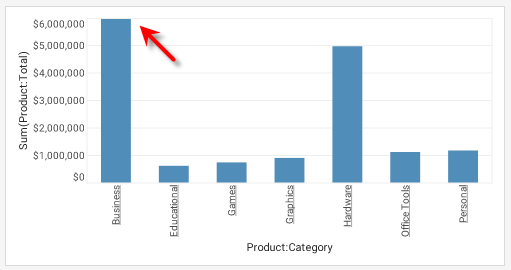
|
Either syntax below can be used in component script: For onInit/onRefresh scripts, and for component and property scripts on other components, the second (qualified) form is required. |