bindingInfo.setShapeField()
|
Bind the specified field to a ShapeFrame (shape coding). The aesthetic treatment applied to the chart elements depends on the type of the chart:
-
A Bar Chart applies a TextureFrame, which draws different fill patterns. (For dimension binding, the default is the CategoricalTextureFrame. For measure binding, the default is LeftTiltTextureFrame.)
-
A Line Chart applies a LineFrame, which draws different line styles. (For dimension binding, the default is the CategoricalLineFrame. For measure binding, the default is LinearLineFrame.)
-
A Point Chart applies a ShapeFrame, which draws different shape types. (For dimension binding, the default is the CategoricalShapeFrame. For measure binding, the default is FillShapeFrame.)
Parameter
- col
-
Field to be used for shape-coding
- type
-
One of the following:
Chart.STRING,Chart.DATE, orChart.NUMBER
Examples
Chart1.bindingInfo.setShapeField("Employee",Chart.STRING);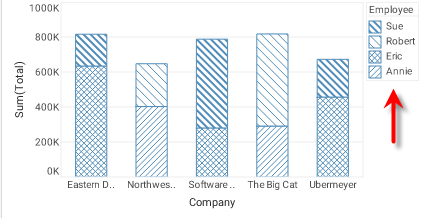
Chart1.bindingInfo.setShapeField("Total",Chart.NUMBER);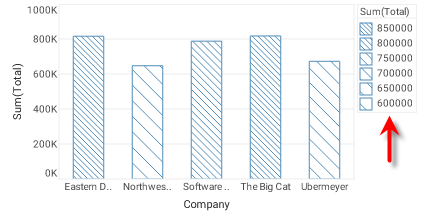
Dashboard script that modifies bindingInfo should generally be placed in the onRefresh handler. See Add Dashboard Script.
|