Data Tab
| Common Properties in Dashboard Object Reference to set these properties dynamically using script. |
The Data tab in the ‘Properties’ panel is common to many components. This tab allows you bind the component to the data source that supplies the data displayed by the component.
Properties that offer the ‘Value Type’ button  can also be set by the user (‘Variable’) or by scripted logic (‘Expression’). See Dynamically Set Properties for more information. can also be set by the user (‘Variable’) or by scripted logic (‘Expression’). See Dynamically Set Properties for more information.
|
| The Data tab has a different layout for Filter components. See Selection List Properties for more details. |
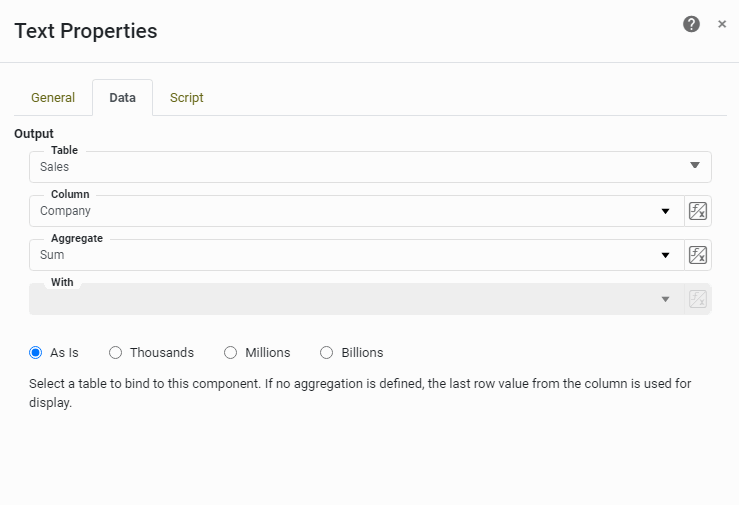
The Data tab has the standard properties shown below.
- Table
-
The data model, table, or Data Worksheet data block to which the component is bound.
You can also associate data with a component by dragging a field from the data source in the Toolbox panel onto the component. This will automatically set the ‘Table’ and ‘Column’ properties. - Target
-
For Form components (Radio Button, Spinner, etc.), the Embedded Table or Variable in the Data Worksheet to which the form value is passed. (See Dynamically Set Properties for further details.)
- Column
-
The field in the selected table that supplies data to the component.
- Aggregate
-
The method of data aggregation/summarization.
- With
-
A second data field for aggregation methods requiring two operands.
- Value
-
The scaling factor used to display data on output components:
-
As Is: No scaling.
-
Thousands: Displayed values are divided by 103.
-
Millions: Displayed values are divided by 106.
-
Billions: Displayed values are divided by 109.
-