Edit a Connection
To edit an existing database connection, follow the steps below.
-
Press the top ‘Data’ button
 in the Portal.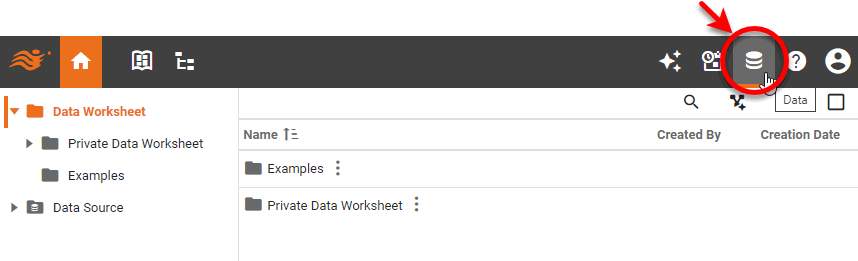
-
Select the ‘Data Source’ folder and locate the desired data source.
-
Press the ‘More Options’ button
 next to the database connection that you want to edit, and select the ‘Edit’ option from the menu.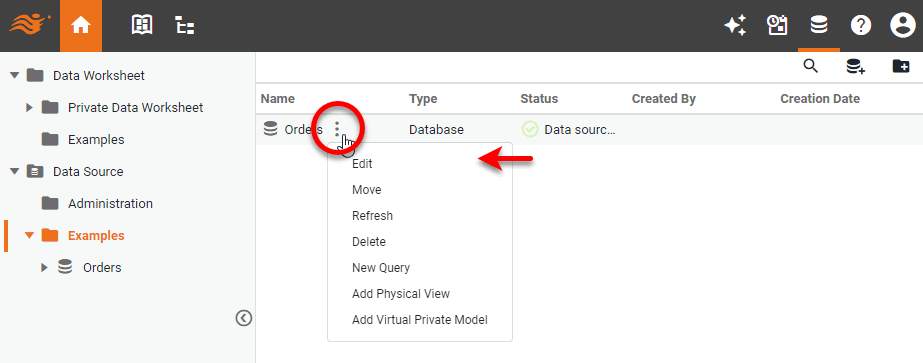
-
Proceed to edit the connection settings as described in Connect to a Specific Data Source.
-
To delete the connection, select the ‘Delete’ option from the menu.
-
To refresh the connection, select the ‘Refresh’ option from the menu. This refreshes the cached table information (meta-data) stored by the server.
-
To move a data source to another folder, select the ‘Move’ option from the menu and specify the new location.
To create a new data source folder, press the ‘New Folder’ button  in the toolbar.