Specify Security Provider
A security provider is a module that handles security operations for the InetSoft server. You can specify independent security providers to provide the following functions:
- Authentication
-
Retrieving users, roles, and groups; authenticating logins.
- Authorization
-
Storing and retrieving permissions for different components and functions.
To specify a security provider, follow the steps below:
-
Press the ‘Settings’ button
 at the top of Enterprise Manager.
 -
Select the Security page in the left panel.
-
Select ‘Enable Security’ to activate security settings.
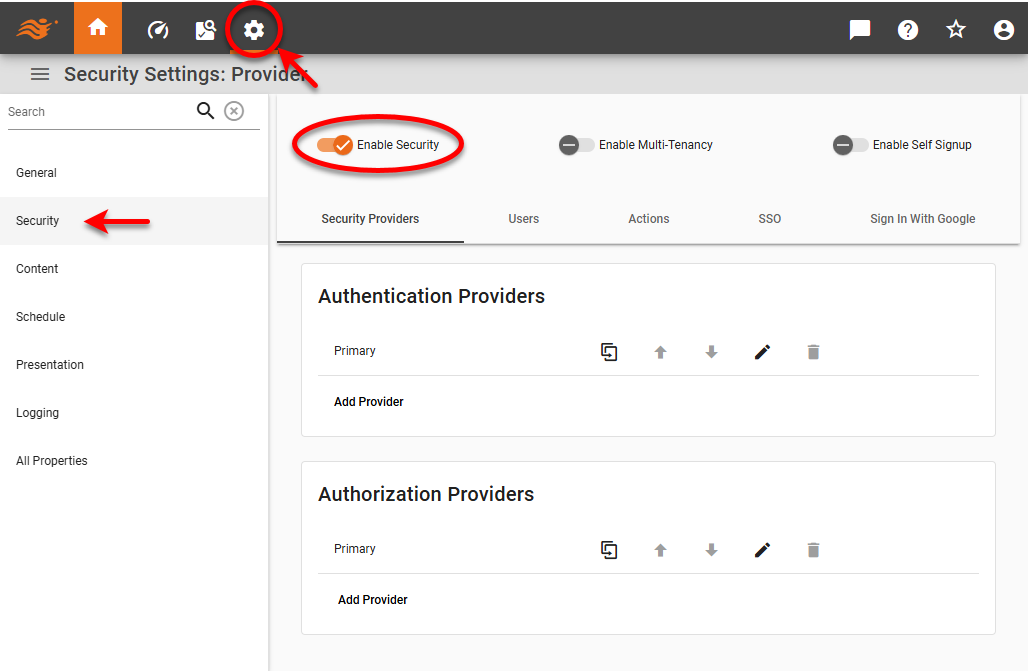
-
Optional: To allow users from multiple organizations to access the server, check ‘Enable Multi-Tenancy’. See Enable Multi-Tenancy for more information.
-
Optional: Check ‘Enable Self Signup’ to enable the ‘Create an Account’ option for users on the login page. See Enable Self-Signup.
-
In the ‘Authentication’ menu, press the ‘Edit’ button
 next to ‘Primary Provider’ or press ‘Add Provider’ and enter a provider name. Select the desired provider type for verifying user login credentials (‘Default’, ‘LDAP’, ‘Database’, or ‘Custom’).
 -
In the ‘Authorization’ menu, press the ‘Edit’ button
next to ‘Primary Provider’ or press ‘Add Provider’ and enter a provider name. Select the desired provider type for assigning asset and activity permissions (‘Default’ or ‘Custom’). -
Optional: Add any additional authentication or authorization providers by repeating the above steps. Press the ‘Duplicate Content’ button
 for an existing provider to copy those settings to the new provider, if desired.For Chaining Security Providers:
-
For authorization, when the InetSoft server searches for an individual item (user, group, role, permission), it will reference the first provider that contains the item. When it searches for a list all items of a particular type, the set of items from all providers will be used.
-
For authentication, the first provider that contains the given user will be used to authenticate. Note that if the authentication chain has first Provider 1 and then Provider 2, and both providers contain a given user but with different credentials, when the user tries to log in with Provider 2’s credentials, the login will fail. This is because Provider 1 is the first in the chain that contains the user (with different credentials).
-
To create a backup LDAP server, simply chain together two providers. The first provider in the chain will be the primary LDAP server, and the second provider in the chain will be the backup.
-
To facilitate recovery from a change in LDAP or database administrator credential, create a secondary file-based (default) provider that contains a fallback administrative user.
-
The available provider types are as follows:
- Default (File)
-
This is the built-in security provider, and can be used for both authentication and authorization.
-
When using the ‘Default Security Provider’, the default login/password to the Enterprise Manager is admin/admin.
-
When you select the default security provider for authentication, create users, groups, and roles as explained in Create a User, Create a Role, and Create a Group. When you select the default security provider for authorization, assign permissions for components, capabilities, and assets as explained in Set Repository Permissions and Set Security Actions.
-
- LDAP
-
This specifies a third-party LDAP server (e.g., Active Directory) that contains your users/groups/roles, and can be used for authentication only. For more information, see Configure LDAP Security.
-
Assign permissions for components, capabilities, and assets as explained in Set Repository Permissions and Set Security Actions.
-
Create users, groups, and roles using the LDAP platform.
-
- Database
-
This specifies queries to retrieve user/role/group information a database schema, and can be used for authentication only. For more information, see Configure Database Security.
This feature is available only in Enterprise Edition. -
Assign permissions for components, capabilities, and assets as explained in Set Repository Permissions and Set Security Actions.
-
Create users, groups, and roles using the database platform.
-
- Custom
-
This specifies a Java class that implements the ‘Security Provider’ interface, and can be used for both authentication and authorization. See Configure Custom Security or more details.
This feature is available only in Enterprise Edition. Enter the custom configuration in the ‘JSON Configuration’ panel. Security classes have the following methods that you can overwrite to suit your needs:
void readConfiguration(com.fasterxml.jackson.databind.JsonNode configuration)
com.fasterxml.jackson.databind.JsonNode writeConfiguration(com.fasterxml.jackson.databind.ObjectMapper mapper)