bindingInfo.setTopNReverse(field, header, Boolean)
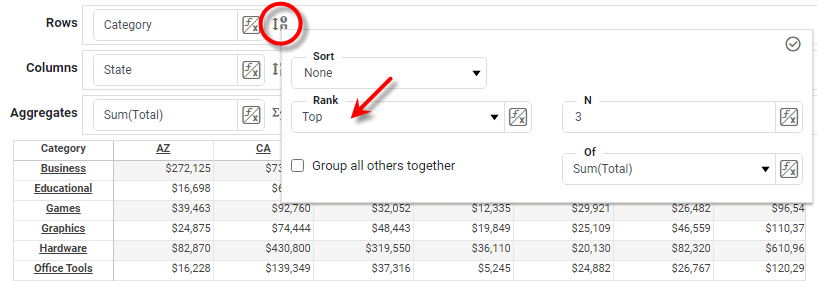
Specifies whether groups are selected from the top or bottom of the ranking according to the given measure. When true, this is equivalent to selecting ‘Bottom’ in the ‘Ranking’ menu in the Crosstab Editor. When false, this is equivalent to selecting ‘Top’ in the ‘Ranking’ menu in the Crosstab Editor.
This function should always be used in conjunction with bindingInfo.setTopN(field, header, number) and bindingInfo.setTopNSummaryCol(field, header, measure).
Parameters
- field
-
String: Name of a column to rank
- header
-
StyleConstant.ROW_HEADERorStyleConstant.COLUMN_HEADER - Boolean
-
truefor 'Bottom',falsefor 'Top'
Example
Crosstab1.query = 'Sales';
Crosstab1.bindingInfo.rowFields = ['Name'];
Crosstab1.bindingInfo.colFields = ['Region'];
Crosstab1.bindingInfo.measureFields = ['Total'];
Crosstab1.bindingInfo.setFormula('Total', StyleConstant.SUM_FORMULA);
Crosstab1.bindingInfo.showColumnTotal = true;
Crosstab1.bindingInfo.setTopN('Name',StyleConstant.ROW_HEADER,3);
Crosstab1.bindingInfo.setTopNSummaryCol('Name',StyleConstant.ROW_HEADER,'Sum(Total)');
Crosstab1.bindingInfo.setTopNReverse('Name',StyleConstant.ROW_HEADER,false);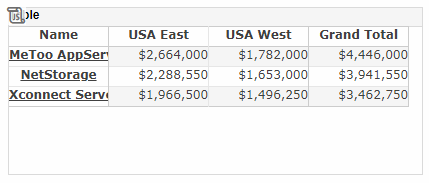
|
Either syntax below can be used in component script: For onInit/onRefresh scripts, and for component and property scripts on other components, the second (qualified) form is required. |