fillZero
When you set fillTimeGap to true, the fillZero property determines whether gaps are represented as null, which leaves an empty space at the location, or as zero, which inserts a numerical value of 0 at the location.
Examples
Example 1: Leave gap (null) for missing data
Chart1.fillTimeGap = true;
Chart1.fillZero = false;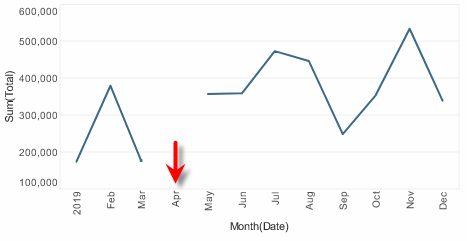
Example 2: Insert zero for missing data
Chart1.fillTimeGap = true;
Chart1.fillZero = true;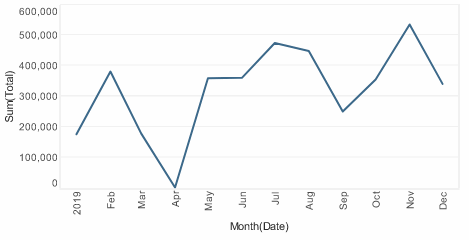
|
Either syntax below can be used in component script: For onInit/onRefresh scripts, and for component and property scripts on other components, the second (qualified) form is required. |