Localize a Data Source
You can use a simple text mapping to localize data source names, data model names (entity/attribute), and query (column) names.
Create SreeBundle Mapping File
Create a mapping file that specifies the text substitutions for data source names. (This is the same file that you use to map Dashboard element text. See Localize a Dashboard.)
| A localization can not take effect until you register the locale in Enterprise Manager. See Register a Locale. |
File Name
See Localize a Dashboard for information on how to name the SreeBundle mapping file.
File Contents
Each data source translation is specified by a single line of text in the localization file:
{datasource_name}={translated_datasource_name}
The {datasource_name} is the actual label of the data source, query column, data source entity, etc. Spaces and certain other non-alphanumeric characters in the {datasource_name} must be escaped by a backslash, for example, ‘All\ Sales’. The {translated_datasource_name} is the translated label for data source, query column, data source entity, etc. Spaces in the {translated_datasource_name} do not need to be escaped.
The French Canadian localization file mentioned in Localize a Dashboard, SreeBundle_fr_CA.properties, might contain the following lines of text, where, for purposes of illustration, Orders_fr is used as the French translation of Orders, and so on:
Orders = Orders_fr
All\ Sales = All Sales_fr
The above mapping translates the ‘Orders’ data source and ‘All Sales’ Data Worksheet labels into the specified mock French text:
| Label | Translated Label |
|---|---|
Orders |
Orders_fr |
All Sales |
All Sales_fr |
Find Available Localization Targets
To determine the elements for which you need to provide a localization, it is helpful to download a sample SreeBundle file. To do this, follow the steps below:
-
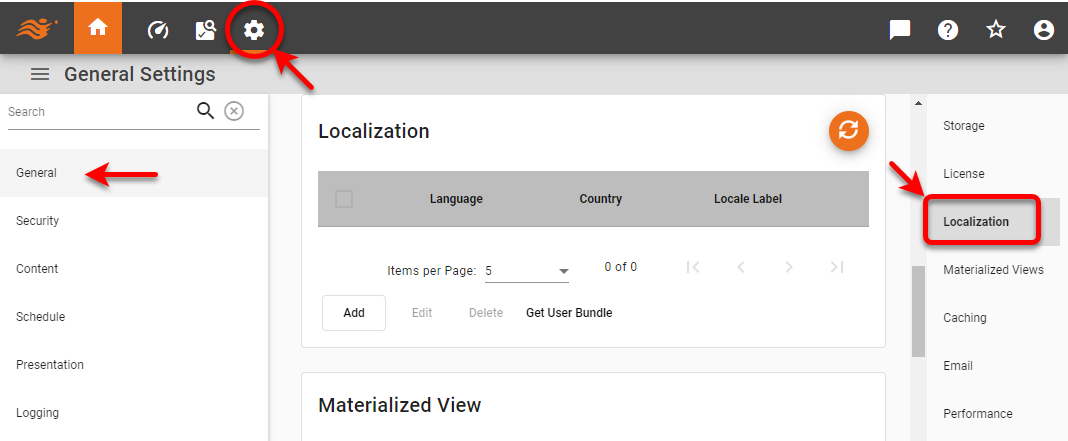
Press the ‘Settings’ button
 at the top of Enterprise Manager.
 -
Select the General page in the left panel, and select the Localization page in the right panel.
-
Press the Get User Bundle button.
This downloads a file called user_bundle.properties that contains a list of all properties that can be localized, including Text IDs in Dashboards, data source names, and so on. By adding localized text for all the entries in the file, you can ensure that your localization is complete.