dataConditions
| Property is read-only. It cannot be set in script. |
| Drill Down into Data for more information about flyover views. |
Returns the Flyover View conditions that are currently in effect on a filtered component. The dataConditions property provides an array of attributes, attr[], and an array of values, value[], that contain the conditions for all flyover filters currently being applied to a specified component.
Type
- dataConditions.attr[]
-
Array of filtered dimension labels
- dataConditions.value[]
-
Array of filtered dimension values
Example
Consider a Chart that uses a flyover view to filter a Table named “Query1”. If the ‘On Click Only’ option is set for the Chart flyover (and therefore multiple Chart groups can be selected in the flyover), the Table’s dataConditions.attr[] and dataConditions.value[] arrays will each contain one item for every group the user selects on the Chart. You can iterate through these arrays to obtain the currently selected dimensions and values.
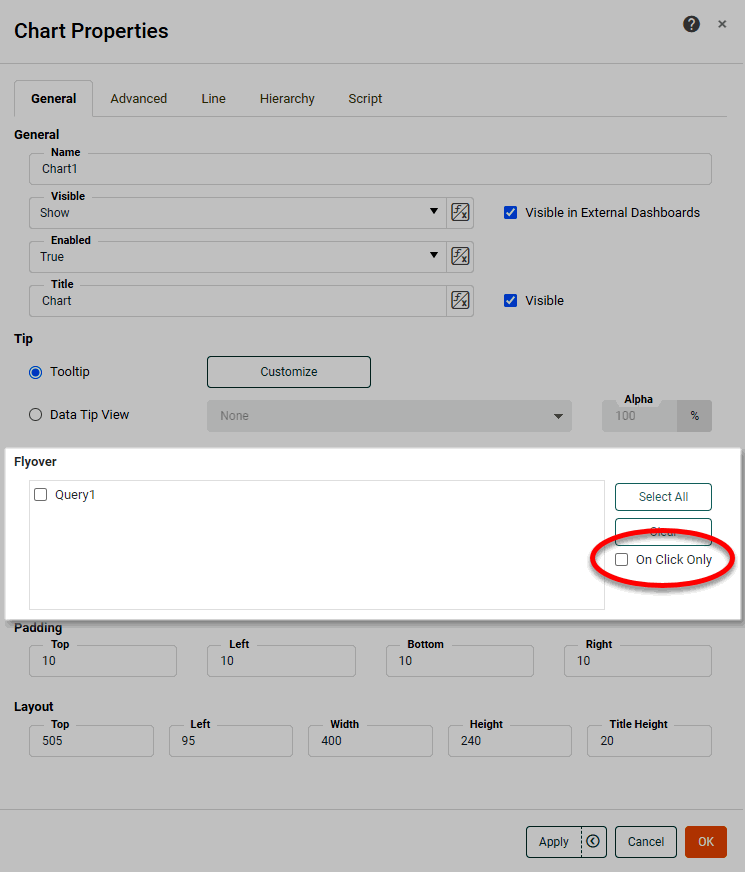
The script below is placed in the Script tab of the Table component (“Query1”) that is being filtered, and modifies the title property of the Table.
var conds = Query1.dataConditions;
var txt = 'Filter: None';
if(!isNull(conds)) {
  txt = 'Filter: ' + conds[0].attr + ' = ';
  for(var i=0;i<conds.length;i++) {
    txt += conds[i].value;
    if(i != conds.length-1) {
      txt += ', '
     }
  }
}
Query1.title = txt;| This script could also be written as an expression for the ‘Title’ property in the General tab. |
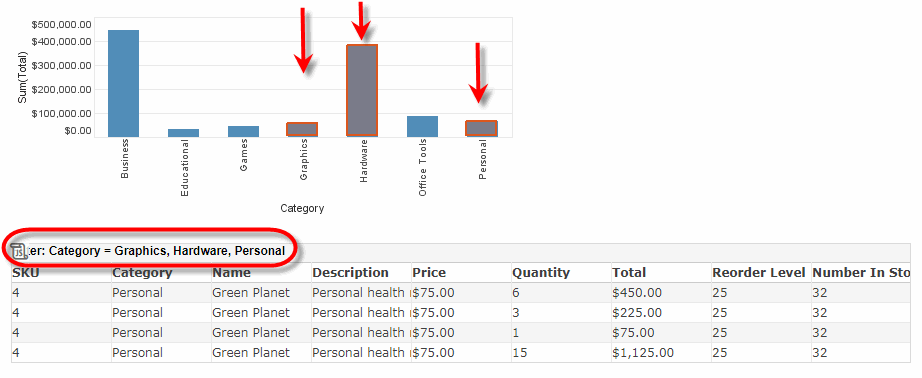
When the user selects groups on the Chart, the Table’s title bar indicates the current flyover filter applied to the Table.
|
Either syntax below can be used in component script: For onInit/onRefresh scripts, and for component and property scripts on other components, the second (qualified) form is required. |