thisParameter
| parameter for a list of methods to create Dashboard parameters. |
The thisParameter property allows you to read and write parameters that exist in the context of an embedded Dashboard. See Modularize a Dashboard for information about embedding one Dashboard within another dashboard. The syntax for using thisParameter is
DashboardName.thisParameter.variableNamewhere DashboardName is the name assigned to the embedded Dashboard in the ‘Dashboard Properties’ dialog box, and variableName is the name of the parameter defined in the embedded Dashboard.
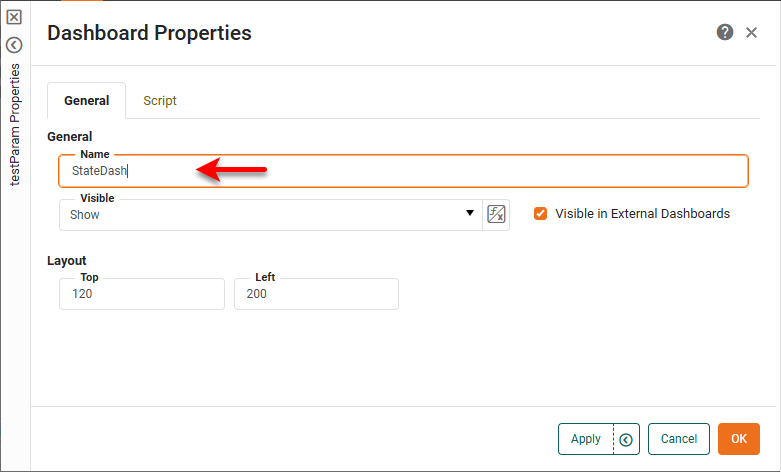
To open the ‘Dashboard Properties’ dialog box, right-click on the embedded Dashboard (within the host Dashboard), and select ‘Properties’ from the menu. Note: You can also access menu options from the ‘More’ button ( ) in the mini-toolbar. ) in the mini-toolbar.
|
If you place the script that accesses thisParameter.variableName in the Script tab of the ‘Dashboard Properties’ dialog box (shown above), you do not need to qualify it with the Dashboard name.
Examples
Read value of
stateSelector parameter in embedded Dashboard 'StateDash'StateDash.thisParameter.stateSelectorRead value of RadioButton1 Form component in embedded Dashboard 'StateDash'
StateDash.thisParameter.RadioButton1Define new parameter for embedded Dashboard 'StateDash'
StateDash.thisParameter.myParamName = 'Hello';