Mixpanel Query
To create a new data set from an existing Mixpanel connection, follow the steps below:
-
If you have not yet configured the database connection, see Mixpanel. Then proceed with the steps below.
If you see the ‘Create Visualization’ dialog box, press the ‘Close’ button
 to continue with the steps below (recommended).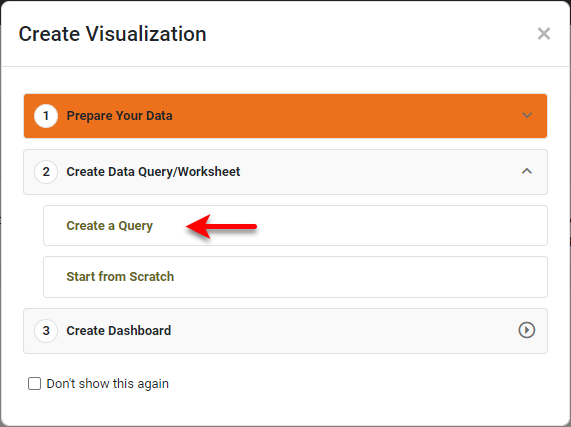
You can also press Create a Query to open the ‘New Data Worksheet’ dialog box, where you can select the query you wish to create. This allows you to skip the ‘Add’ button
 and proceed to the next steps.
 -
Open the Data Worksheet that will contain the data. (See Create a Data Worksheet or Edit a Data Worksheet.)
-
Press the ‘Add’ button
, and select ‘Mixpanel Query’  . This opens the ‘Mixpanel Query’ dialog box.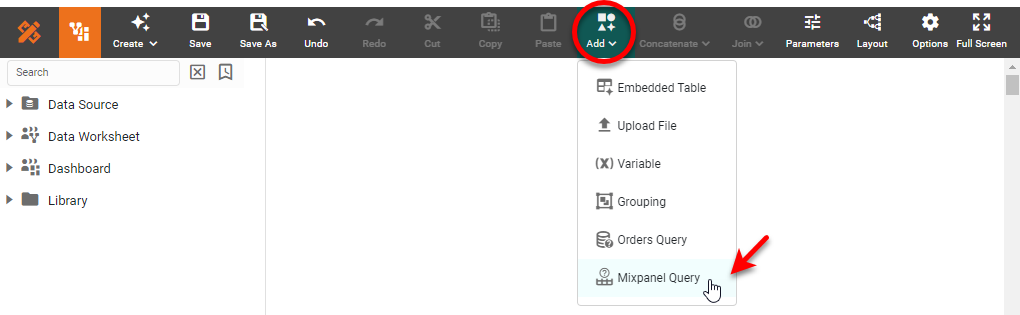
-
Select the desired endpoint from the ‘Endpoint’ menu. Enter values for the properties provided for that endpoint.
-
Optional: To add additional parameters, press the Add button. To remove a parameter, check the corresponding box and press the Remove button.
-
Enter the desired ‘JSON Path’. See JSONPath - XPath for JSON for information about the JSON Path syntax.
-
Optional: Select ‘Expand Arrays’ to expand a record that contains an array into multiple records.
Example: Expand Arrays…
Consider the following JSON:
{
    "id": 1,
    "items": [
        {
            "id": 1,
            "name": "Object 1",
            "list1": [ "Item 1.1.1", "Item 1.1.2" ],
            "list2": [ "Item 1.2.1", "Item 1.2.2" ]
        },
        {
            "id": 2,
            "name": "Object 2",
            "list1": [ "Item 2.1.1", "Item 2.1.2" ],
            "list2": [ "Item 2.2.1", "Item 2.2.2" ]
        }
    ]
}
If ‘Expand Arrays’ and ‘Top Level Only’ are both enabled (and ‘JSON Path’ is
$or blank), the top level of the array will be expanded into its individual items.
If ‘Top Level Only’ is disabled, all arrays will be fully expanded in parallel, as shown below:

To selectively expand only certain portions of the result, deselect the ‘Top Level Only’ option, and use the ‘Expanded Array Path’ field to specify the portion of the JSON path on which arrays should be expanded. For example, set ‘Expanded Array Path’ to
items.list1to expand theitemsandlist1arrays. (The top level array is always expanded.)
-
Optional: Enter a ‘Timeout’ in seconds to limit the query execution time.
-
Press OK. This creates a new data block in the Data Worksheet.
-
Optional: Right-click on the data block, and select ‘Properties’ from the context menu. Note: You can also access menu options from the ‘More’ button (
 ) in the mini-toolbar. This opens the ‘Table Properties’ panel. In the ‘Name’ field, enter a name for the data block, and press ‘OK’. (See Modify a Column for information about how to rename columns.
Names must be unique without respect to case (e.g., "num1" is the same name as "Num1"). -
Press the ‘Save’ button
 in the toolbar to save the Data Worksheet.
You can now do pipeline operations on this data, as described in Prepare Your Data, or you can proceed to create Dashboards based on this Data Worksheet. See Visualize Your Data for information about how to construct a Dashboard.