Configure Database Security
| This feature is available only in Enterprise Edition. |
To use a database for authentication (i.e., verifying user credentials), select the ‘Database’ option from the ‘Authentication’ menu on the ‘Security Provider’ page. (See Specify Security Provider.) Enter the following settings:
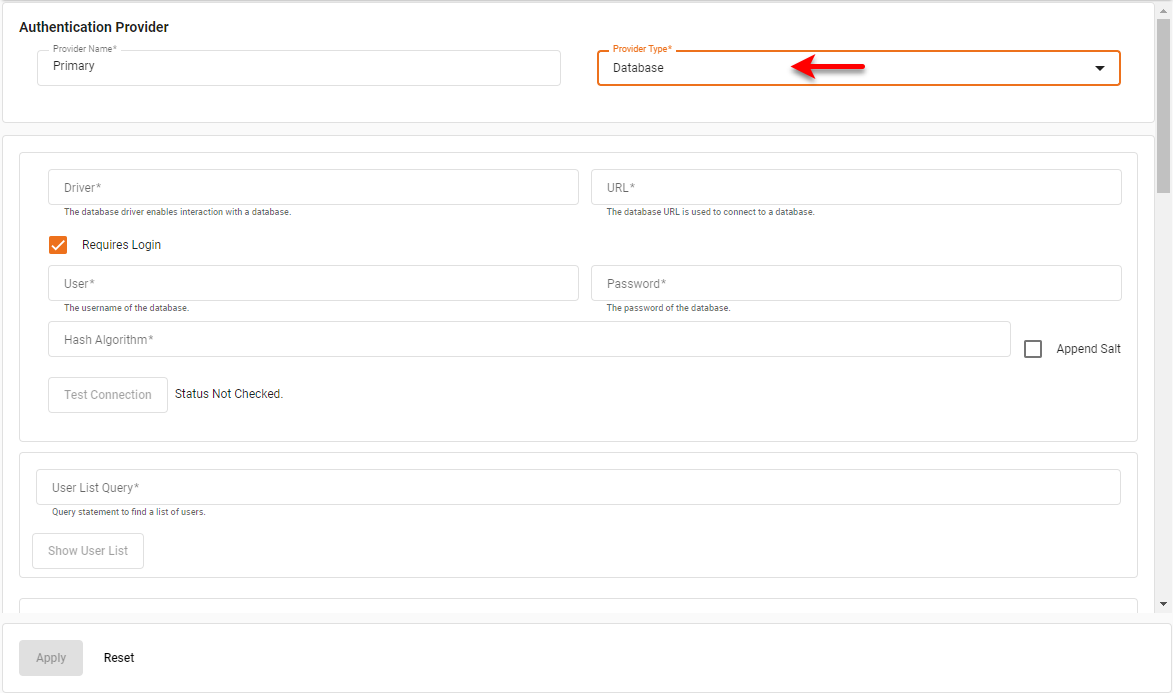
| If multi-tenancy is enabled (see Enable Multi-Tenancy) but the database does not contain organization information, leave the “Organization” queries blank. All members are then processed as belonging to the default Host Organization. |
- Driver
-
The driver class name (e.g.,
com.mysql.jdbc.Driver). Corresponding property:security.dbap.driver. - URL
-
The database URL (e.g.,
jdbc:mysql://localhost:3306/myDatabase). Corresponding property:security.dbap.url. - User
-
The username for the database. Corresponding property:
security.dbap.user. - Password
-
The password for the database.
security.dbap.password. - Hash Algorithm
-
The hash algorithm used to hash the passwords in the database. Corresponding property:
security.dbap.hash.algorithm.Available Hash Algorithm ValuesBCRYPT,GOST3411,GOST3411-2012-256,GOST3411-2012-512,KECCAK-224 KECCAK-288,KECCAK-256,KECCAK-384,KECCAK-512,MD2,MD4,MD5,SHA-1 RIPEMD128,RIPEMD160,RIPEMD256,RIPEMD320,SHA-224,SHA-256,SHA-384 SHA-512,SHA-512/224,SHA-512/256,SHA3-224,SHA3-256,SHA3-384,SHA3-512 Skein-256-128,Skein-256-160,Skein-256-224,Skein-256-256,Skein-512-128 Skein-512-160,Skein-512-224,Skein-512-256,Skein-512-384,Skein-512-512 Skein-1024-384,Skein-1024-512,Skein-1024-1024,SM3,TIGER,WHIRLPOOL BLAKE2B-512,BLAKE2B-384,BLAKE2B-256,BLAKE2B-160,BLAKE2S-256 BLAKE2S-224,BLAKE2S-160,BLAKE2S-128,DSTU7564-256,DSTU7564-384 DSTU7564-512 - Append Salt
-
Enable to append salt; disable to prepend salt. Corresponding property:
security.dbap.salt.append. - Users Query
-
A query that takes a username as a parameter and returns username, password, optional salt. Corresponding property:
security.dbap.user.query. - User List Query
-
A query that returns a list of users. Corresponding property:
security.dbap.user.list.query. Press the Show User List button to display the query results. - User Roles Query
-
A query that takes a username as a parameter and returns a list of roles for a given user. Corresponding property:
security.dbap.user.roles.query. - User Emails Query
-
A query that takes a username as a parameter and returns a list of emails for a given user. Corresponding property:
security.dbap.user.emails.query. - Group Users Query
-
A query that takes a group name as a parameter returns a list of users for a given group. Corresponding property:
security.dbap.group.users.query.
- Group List Query
-
A query that returns a list of groups. Corresponding property:
security.dbap.group.list.query. Press the Show Group List button to display the query results. - Role List Query
-
A query that returns a list of roles. Corresponding property:
security.dbap.role.list.query. Press the Show Role List button to display the query results. - Organization List Query
-
Optional: For a multi-tenant environment, a query that returns a list of organizations. Corresponding property:
security.dbap.organization.list.query. Press the Show Organization List button to display the query results.Exampleselect distinct ORGANIZATION from usertableIf multitenancy is enabled but the database does not contain organization information, leave ‘Organization List Query’ empty and use the “Multi-tenancy disabled” version of the user, group, and role queries shown above. - Organization Members Query
-
Optional: For a multi-tenant environment, a query that returns a list of organization members. Corresponding property:
security.dbap.organization.members.query. Press the Show Organization Members button to display the query results.Exampleselect distinct username, "group", "role" from usertable where organization = ?If multitenancy is enabled but the database does not contain organization information, leave ‘Organization Members Query’ empty and use the “Multi-tenancy disabled” version of the user, group, and role queries shown above. - Organization Name Query
-
Optional: For a multi-tenant environment, a query that returns the organization name. Corresponding property:
security.dbap.organization.name.query. Press the Show Organization Name button to display the query results.Exampleselect ORGANIZATIONNAME from usertable where ORGANIZATION = ?If multitenancy is enabled but the database does not contain organization information, leave ‘Organization Name Query’ empty and use the “Multi-tenancy disabled” version of the user, group, and role queries shown above. - System Administrator Roles
-
Roles for the system administrator.
- Organization Administrator Roles
-
Roles for the organization administrator.
Press the Test Connection button to verify that the database is accessible. See Set Repository Permissions and Set Security Actions for details on how to assign permissions for components, capabilities, and assets managed by the server.