Audit
| This feature is available only in Enterprise Edition. |
The audit feature tracks Dashboard and data access, as well as asset dependencies. When auditing is enabled, all server and database activities are logged in the audit database, and audit status is written to the server logs at ‘Error’ and ‘Warning’ log levels. (See Logs for more information.) Note that auditing requires you to enable a security provider (see Specify Security Provider).
Passwords for external services such as databases and LDAP servers are securely encrypted using a password-derived key. To change the password, run the :security change-master-password command from the Administration Console. (See Automate Admin Tasks.) Use the system Environment Variable INETSOFT_MASTER_PASSWORD to provide the password (default: success123) to the InetSoft application. If you set INETSOFT_MASTER_PASSWORD before you run the application the first time, the INETSOFT_MASTER_PASSWORD password is used instead of the default.
|
View an Audit
To view an audit summary, follow the steps below:
-
Press the ‘Auditing’ button
 at the top of Enterprise Manager.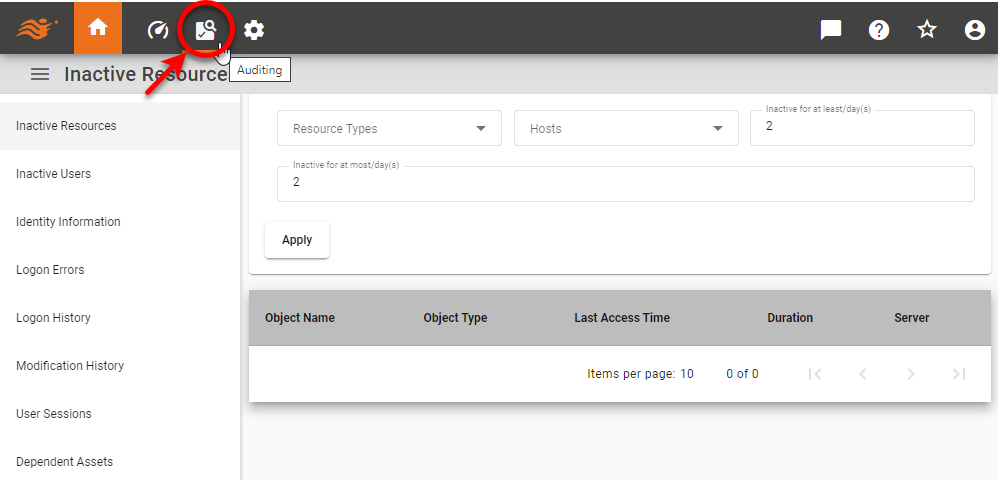
-
Click on the desired audit, enter the requested parameters, and press OK to generate the summary.
Available Audit Data
The following audit datasets are available:
- Bookmark History
-
Listing of Dashboard bookmarks created by users.
- Dependent Assets
-
Listing of assets that depend on a selected asset. (Data source connections are not checked.) This listing is updated with new information when the built-in ‘Update Asset Dependencies’ scheduled task runs. See Monitor Scheduled Tasks to see task status, and to run the task on demand.
- Export History
-
Listing of Dashboards that have been exported by users.
- Identity Information
-
Listing of modifications to user identity information.
- Inactive Resource
-
Listing of resources not used over a selected period.
- Inactive Users
-
Listing of users who have not logged in over a selected period.
- Logon Errors
-
Listing of login errors over a selected period.
- Logon History
-
Listing of session logins and logouts over a selected period.
- Modification History
-
Listing of assets modified over a selected period.
- Required Assets
-
Listing of assets that are required by a selected asset. (Data source connections are not checked.) This summary is updated with new information when the built-in ‘Update Asset Dependencies’ scheduled task runs. See Monitor Scheduled Tasks to see task status, and to run the task on demand.
- Schedule History
-
Listing of Scheduler activities over a selected period.
- User Session
-
Listing of user session times.
Configure the Audit Database
You can configure the Audit database in the docker-compose.yaml file. This may be useful if you want to generate custom audit dashboards from the audit data. You can connect to the custom JDBC URL as you would connect to any other JDBC data source. (See JDBC in Use the Portal.)
| It is not possible to create custom audit dashboards from the default Audit database. You can only access the default database through the Available Audit Data above. |
The following listing shows sample variables that should be added to docker-compose.yaml before container creation to use the custom database for audit records. The following custom databases are supported: Cosmos DB, DynamoDB, H2, Firestore, and MongoDB.
INETSOFTCONFIG_AUDIT_TYPE: "cosmosdb"
INETSOFTCONFIG_AUDIT_COSMOSDB_ACCOUNTHOST: "https://cosmosdb:8081"
INETSOFTCONFIG_AUDIT_COSMOSDB_ACCOUNTKEY: "your_account_key"
INETSOFTCONFIG_AUDIT_COSMOSDB_DATABASE: "inetsoft"
INETSOFTCONFIG_AUDIT_COSMOSDB_CONTAINER: "inetsoft"
INETSOFTCONFIG_AUDIT_COSMOSDB_THROUGHPUT: 400INETSOFTCONFIG_AUDIT_TYPE: "dynamodb"
INETSOFTCONFIG_AUDIT_DYNAMODB_ENDPOINT: http://dynamodb:8000
INETSOFTCONFIG_AUDIT_DYNAMODB_REGION: "us-east-1"
INETSOFTCONFIG_AUDIT_DYNAMODB_TABLE: "inetsoft-app-audit-table"
INETSOFTCONFIG_AUDIT_DYNAMODB_ACCESSKEYID: keyid
INETSOFTCONFIG_AUDIT_DYNAMODB_SECRETACCESSKEY: secretkeyINETSOFTCONFIG_AUDIT_TYPE: "database"
INETSOFTCONFIG_AUDIT_DATABASE_TYPE: "H2"
INETSOFTCONFIG_AUDIT_DATABASE_JDBCURL: "jdbc:h2:/example/database/path;MODE=Derby;AUTO_SERVER=TRUE;AUTO_SERVER_PORT=8192;AUTO_RECONNECT=TRUE"
INETSOFTCONFIG_AUDIT_DATABASE_DRIVERCLASSNAME: "org.h2.Driver"
INETSOFTCONFIG_AUDIT_DATABASE_DRIVERCLASSPATH: "/path/to/database/driver/h2-2.1.210.jar"
INETSOFTCONFIG_AUDIT_DATABASE_REQUIRELOGIN: true
INETSOFTCONFIG_AUDIT_DATABASE_USERNAME: "inetsoft_admin"
INETSOFTCONFIG_AUDIT_DATABASE_PASSWORD: "password"
INETSOFTCONFIG_AUDIT_DATABASE_TRANSACTIONISOLATIONLEVEL: "READ_UNCOMMITTED"INETSOFTCONFIG_AUDIT_TYPE: "firestore"
INETSOFTCONFIG_AUDIT_FIRESTORE_SERVICEACCOUNTFILE: "/path/to/credentials.json"
INETSOFTCONFIG_AUDIT_FIRESTORE_COLLECTION: inetsoft-audit-storeINETSOFTCONFIG_AUDIT_TYPE: "mongo"
INETSOFTCONFIG_AUDIT_MONGO_HOSTS: 'mongodb:27017'
INETSOFTCONFIG_AUDIT_MONGO_DATABASE: test
INETSOFTCONFIG_AUDIT_MONGO_COLLECTION: inetsoft