Define Number Formats
When applying a number format, users can add a suffix “K”, “M”, or “B” to the pattern string to automatically divide the numerical value by 103, 106, or 109, respectively.
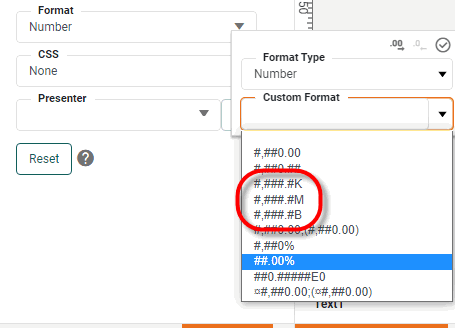
You can define custom symbols and multipliers by adding the desired entries into the userformat.xml file. For example, the following userformat.xml file defines three new multipliers, “halfK”, “halfM”, and “halfB”, that divide the numerical values by 5x10², 5x10⁵, and 5x10⁸, respectively.
<?xml version="1.0" encoding="utf-8"?>
<userFormat>
   <NumberFormat suffix="halfK" multiplier="500"/>
   <NumberFormat suffix="halfM" multiplier="500000"/>
   <NumberFormat suffix="halfB" multiplier="500000000"/>
</userFormat>
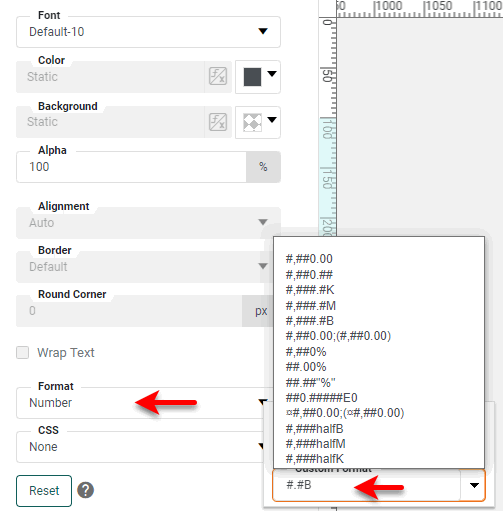
To upload this file to the server, use the User Format button on the Presentation page. (See Look and Feel.) When you restart the server with this userformat.xml file in place, the new suffixes will be available for use with number format patterns, and will be displayed among the format presets for Dashboards:
To redefine the existing “K”, “M”, or “B” suffixes, simply assign these suffixes new values in the userformat.xml file.
<NumberFormat suffix="K" multiplier="..."/>
<NumberFormat suffix="M" multiplier="..."/>
<NumberFormat suffix="B" multiplier="..."/>| The default suffixes can be redefined but not removed. |