StaticColorFrame.setColor(value)
Specifies the static color to be used for positive field values in element script . The static color can also be passed as an input to the constructor. If the data column specified by the inherited VisualFrame.setField(field) function contains (positive) numbers or colors, these data values are used instead of the setColor() value. You can also set this using the bindingInfo.colorFrame.color property syntax in onRefresh script . See Example 2 below. The corresponding “getter” function is getColor().
Paramater (Function Syntax)
- value
-
a java.awt.Color object
Value (Property Syntax)
number (hex)          Example: 0xFF0000
string (color name)   Example: 'red'
array [r,g,b]         Example: [255,0,0]
JSON {r:_,g:_,b:_}    Example: {r:255,g:0,b:0}
java.awt.Color        Example: java.awt.Color.BLUE (BLACK, CYAN, DARK_GRAY,
                               GRAY, GREEN, LIGHT_GRAY, MAGENTA, ORANGE,
                               PINK, RED, WHITE, YELLOW)
Example 1
dataset = [["State", "Quantity"], ["NJ",200], ["NY",300]]; (1)
graph = new EGraph();
var elem = new IntervalElement("State", "Quantity");
var frame = new StaticColorFrame(); (2)
frame.setColor(java.awt.Color(0x00ff00)); (3)
elem.setColorFrame(frame); (4)
graph.addElement(elem);| 1 | See dataset to use a data block instead of an array literal. |
| 2 | Create the StaticColorFrame object. |
| 3 | Use setColor to specify the color for the StaticColorFrame. |
| 4 | Use GraphElement.setColorFrame(frame) to add the ColorFrame to the Chart. |
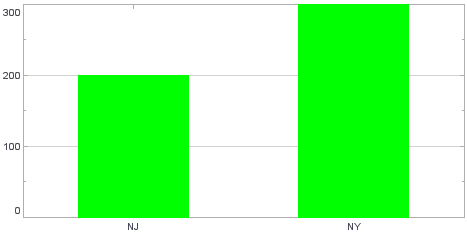
Script that modifies the graph or dataset properties should be placed on the Chart component itself. See Add Component Script for more information. This script has access to the Chart data and Chart API methods. Scripted Charts are not good candidates for user-modification, so you should deselect ‘Enable Ad Hoc Editing’ in the Chart Properties dialog box.
|
|
To change the property on a Chart that was previously created with the Chart Editor, use “getter” methods such as EGraph.getElement(index) ① and GraphElement.getColorFrame() ② to obtain a handle to the desired GraphElement and ColorFrame objects. For example: |
Example 2
This example illustrates how to use bindingInfo properties to control the ColorFrame.
-
Bind a Bar Chart to the sample ‘All Sales’ Data Worksheet, with ‘Company’ (top 5) on the X-axis, and Sum(Total) on the Y-axis.
The ‘All Sales’ Data Worksheet can be found in the folder. You may need to download the examples.zip file from GitHub into your environment. (This requires access to Enterprise Manager.) See Import and Export Assets for instructions on how to import. -
Add the following script in the onRefresh handler. (See Add Dashboard Script.)
onRefresh ScriptChart1.bindingInfo.setColorField("Company",Chart.STRING); Chart1.bindingInfo.colorFrame = new StaticColorFrame; Chart1.bindingInfo.colorFrame.color = 0xFF00FF;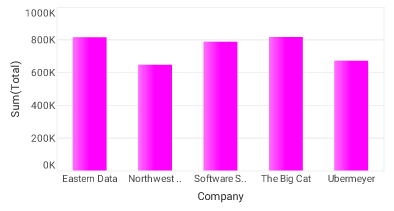
Dashboard script that modifies bindingInfoshould generally be placed in the onRefresh handler. See Add Dashboard Script.