Scheduler Conditions
Set a condition for a scheduled task under the Condition tab. (See Create a Task, Cycle, or Alert.) A condition determines when the scheduled task executes.
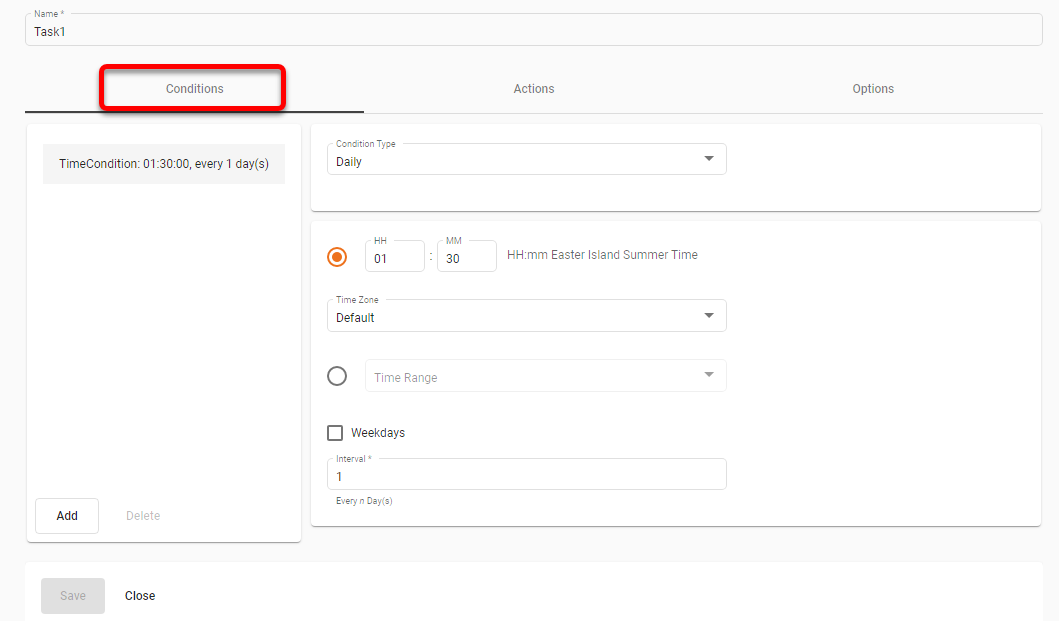
There are two types of conditions available: Time conditions and chained (completion) conditions. These are described below.
|
The Scheduler condition ‘Start Time’ supports both 12-hour or 24-hour time values. To set the time using a 12-hour (AM/PM) clock, use the General Format page to enter a ‘Time Format’ string that ends with the The ‘Time Range’ option for daily, weekly, and monthly tasks allows you to specify a general range when the task should be started. This option may improve performance in cases when tasks from many users are scheduled to execute at around the same time. The task is guaranteed to be started within the selected time range, but actual task start times will be automatically distributed within the range to maximize Scheduler throughput. See Configure the Scheduler for information on how to create custom time ranges. |
- Daily
-
This task will execute every n days (1 day, 2 days, 3 days, etc.) at a specified time. You can also select the weekday option which will execute the task at the specified time on weekdays. Select the desired time zone from the ‘Time Zone’ menu.
- Weekly
-
This task will execute every n weeks (1 week, 2 weeks, 3 weeks, etc.) at a specified time on a specified day of the week, or, optionally, every day of the week. Select the desired time zone from the ‘Time Zone’ menu.
- Monthly
-
This task will execute every nth day of the specified month(s), or every month (e.g., 21st day of February, 25th day of November, etc.) at a specified time; or every nth day of the week of a month, or every month (e.g., 2nd Sunday of April), at a specified time. Select the desired time zone from the ‘Time Zone’ menu.
- Hourly
-
This task will execute every nth hour of the specified days between the specified start time and end time. Select the desired time zone from the ‘Time Zone’ menu.
- Run Once
-
This task will execute once on a certain day at a specified time, e.g., Nov 25, 2006 at 11:30 am. The time is specified as
HH:mm [am|pm], e.g., 11:39 pm. Select the desired time zone from the ‘Time Zone’ menu. - Chained Condition
-
A chained condition is based on the completion status of another scheduled task or a scheduled cycle. The condition evaluates to true only when the specified task or the cycle completes successfully. A completion condition can be specified by selecting the ‘Chained’ option and then specifying the scheduled task or the scheduled cycle.