Copy Data
There are two ways to copy a data block, by using a regular copy, or by using a mirror copy. The following sections explain these methods.
Create a Regular Copy
To create a regular copy of an existing data block or data block flow, follow these steps:
-
To copy a single data block, right-click the data block that you want to copy, and select ‘Copy’ from the context menu. Note: You can also access menu options from the ‘More’ button (
 ) in the mini-toolbar.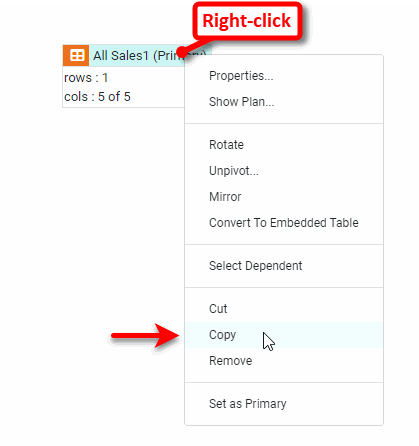
-
To copy multiple data blocks in a data block flow (preserving the relationships between them), use lasso, Ctrl-click, or Shift-click to select the desired data blocks, or right-click a data block and choose ‘Select Dependent’ from the context menu to select related data blocks. Then select ‘Copy’ from the context menu. Note: You can also access menu options from the ‘More’ button (
) in the mini-toolbar. -
Right-click in an empty region of the Data Worksheet and select ‘Paste’ from the context menu. This pastes the data blocks or data block flow into the Data Worksheet.
The new data block(s) are an exact copy of the existing data block(s), but are completely independent. Changes that you make to a copy (e.g., filtering, grouping, etc.) do not affect the original data block.
| You can also create a copy by clicking and dragging on the selected data block or data blocks while holding down the Ctrl key. |
Create a Mirror Copy
A mirrored table looks just like a regular copy, but remains linked to the original table. A mirrored table is useful when you want to manipulate data in a table without affecting dependent assets. In this case, you can mirror the original table and then work with the mirrored copy instead of the original.
To create a mirror copy, right-click the title row of the table to mirror, and select ‘Mirror’ from the right-click menu. Note: You can also access menu options from the ‘More’ button () in the mini-toolbar.
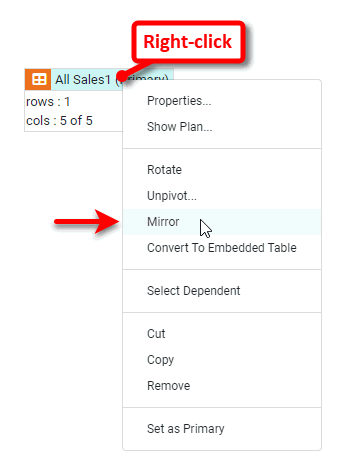
The new mirrored table is created, and a graphical link to the original table is drawn to indicate the dependency.
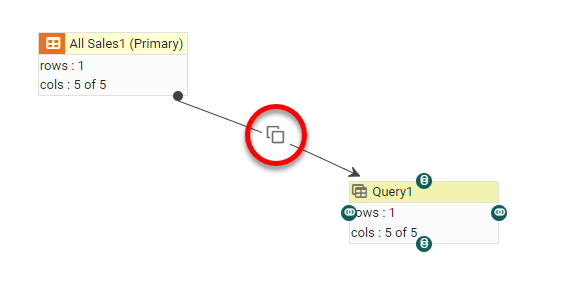
| This link is one-way only: Changes you make to the original table are propagated to the mirrored table, but changes you make to the mirrored table are not propagated to the original table. |