Freehand Table Properties
|
The ‘Freehand Table Properties’ panel provides General, Advanced, and Script tabs. The next sections discuss the Freehand Table-specific properties available under these tabs.
General Tab
The General tab in the ‘Freehand Table Properties’ panel is the same as for regular Tables. See Table Properties.
Advanced Tab
The Advanced tab in the ‘Freehand Table Properties’ panel provides the following Freehand Table-specific properties.
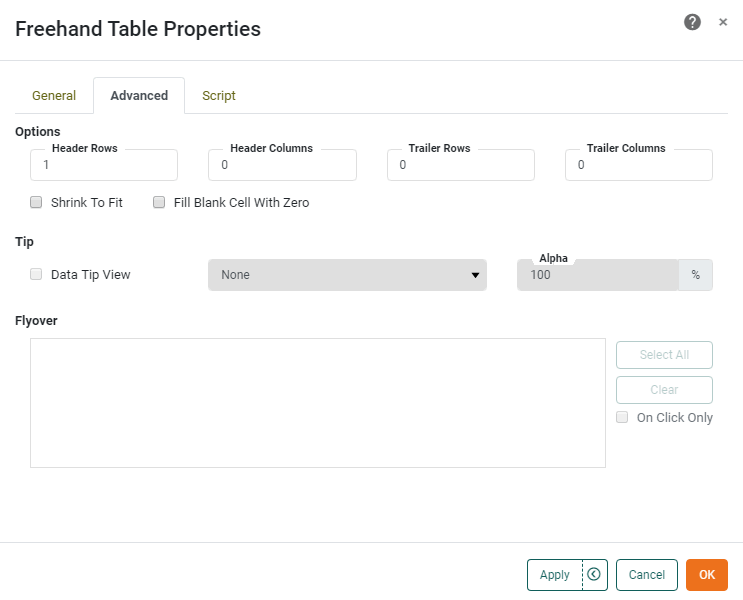
- Header Rows
-
The number of initial rows that should be treated as header rows when a Table Style is applied.
- Header Columns
-
The number of initial columns that should be treated as header columns when a Table Style is applied.
- Trailer Rows
-
The number of final rows that should be treated as trailer rows when a Table Style is applied.
- Trailer Columns
-
The number of final columns that should be treated as trailer columns when a Table Style is applied.
- Shrink to Fit
-
When enabled, this reduces the height of the table to match the number of records displayed, and allows final column width to be set manually. For example, if the original table height (as designed) was 10 rows, and the user then makes selections which restrict the result set to five rows, the bottom table border retracts or “shrinks” to eliminate any empty rows at the bottom of the table.
- Fill Blank Cell With Zero
-
Places a zero value in measure cells corresponding to row and column heading combinations for which no records exist. Otherwise, these cells are simply left blank.
- Data Tip View
-
A Dashboard component is displayed when mouse hovers over the Crosstab or Freehand Table. The component is filtered based on the hover region. See Add Tips to a Chart for more details.
- Flyover Views
-
Allows you to select a set of Dashboard components which will be adaptively filtered as the user hovers the mouse or clicks on the Crosstab or Freehand Table. (Select ‘On Click Only’ if you want the filtered components to update when the user clicks.) See Drill Down into Data for more details.
Script Tab
See Script Tab for information about this common tab.