fillGapWithDash
When you designate a dimension as a “time series” (see bindingInfo.setTimeSeries(col, Boolean)) and set fillTimeGap to true, fillGapWithDash will linearly interpolate missing data using a dashed line.
Example
The following example displays a time-series which is missing data for the month of August 2024. To create this time-series, bind a chart to the ‘Sales Explore’ Data Worksheet.
| The 'Sales Explore' Data Worksheet can be found in . You may need to download the examples.zip file from GitHub into your environment. (This requires access to Enterprise Manager.) See Import and Export Assets for instructions on how to import. |
Place the ‘Date’ field on the X-axis (with ‘Level’ = ‘Month’) and place ‘Total’ on the Y-axis. To simulate missing data, add a condition to the Chart to filter out data from August 2024. (See Add Conditions.) Add the script below to modify the way the Chart represents the missing data for August 2024.
Chart1.fillTimeGap = true;
Chart1.fillGapWithDash = true;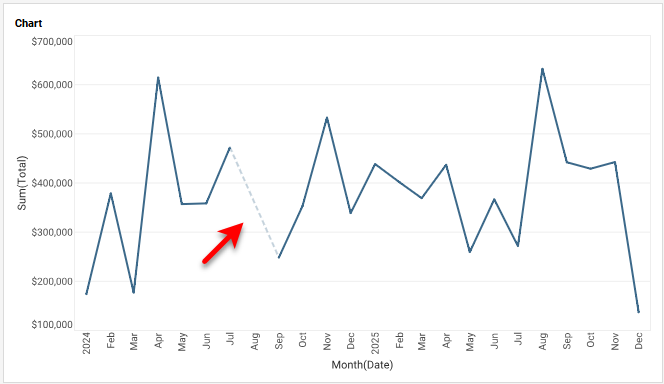
|
Either syntax below can be used in component script: For onInit/onRefresh scripts, and for component and property scripts on other components, the second (qualified) form is required. |