Localize the User Portal
Localizable aspects of the User Portal and Enterprise Manager interfaces include the text in tab elements and nodes of the Repository tree and dialog box labels. The mapping (translation) file that specifies the text substitutions for these interface elements should be ASCII text and should be named
srinter_{language}_{country}.properties
where {language} and {country} are Java-supported two-letter codes for locale language and country. For example, the localization mapping file for Canadian French speakers should be called srinter_fr_CA.properties. Interface localization (“srinter”) files can be placed in any classpath root. For example, you can place the sample srinter_fr_CA.properties file following directory: /usr/local/inetsoft/classes/inetsoft/util.
Each line of text in the “srinter” mapping file should have the following simple format:
{interface_element}={translated_interface_element}
The {interface_element} text in most cases is just the text of the actual interface element, for example, ‘Schedule’ to represent the tooltip displayed in the Schedule tab. Spaces in the {interface_element} text must be escaped by a backslash, for example, My\ Dashboards. The {translated_interface_element} represents the localized text that you want to appear in the interface element. Spaces in the {translated_interface_element} do not need to be escaped.
|
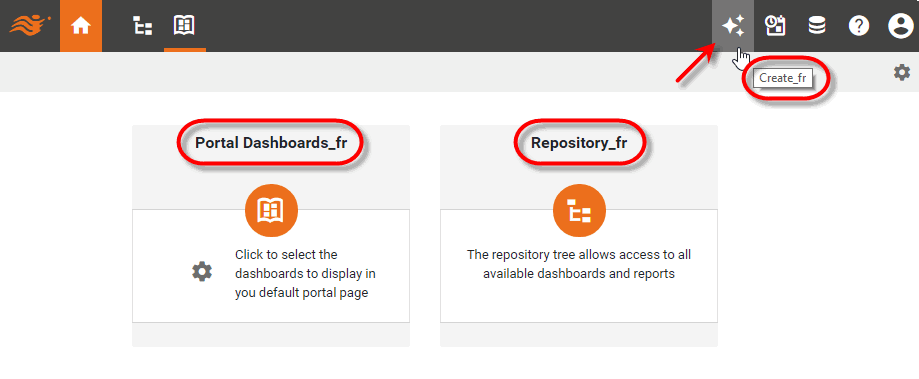
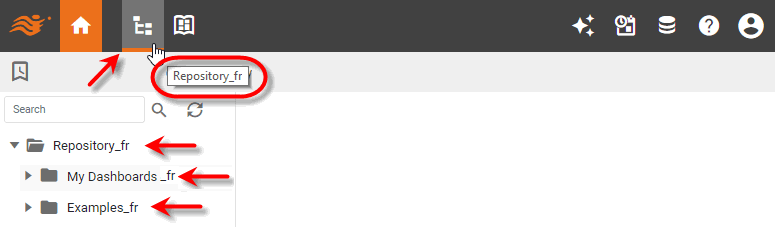
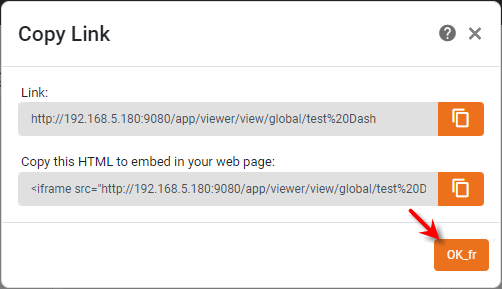
Consider the following French Canadian localization file, srinter_fr_CA.properties, where Repository_fr is used as the French translation of Repository and so on. (You can download this file: srinter_fr_CA.properties.)
Repository = Repository_fr
Portal\ Dashboards = Portal Dashboards_fr
Dashboard = Dashboard_fr
Schedule = Schedule_fr
Create = Create_fr
Home = Home_fr
My\ Dashboards = My Dashboards_fr
Examples = Examples_fr
OK = OK_fr
Cancel = Cancel_fr
The resulting localizations are shown below:
Consult the default srinter.properties file (available upon request) for a complete listing of modifiable interface elements.